


Zaui's New Dashboard and Operations Dashboard: How the Most Advanced Command Center Works
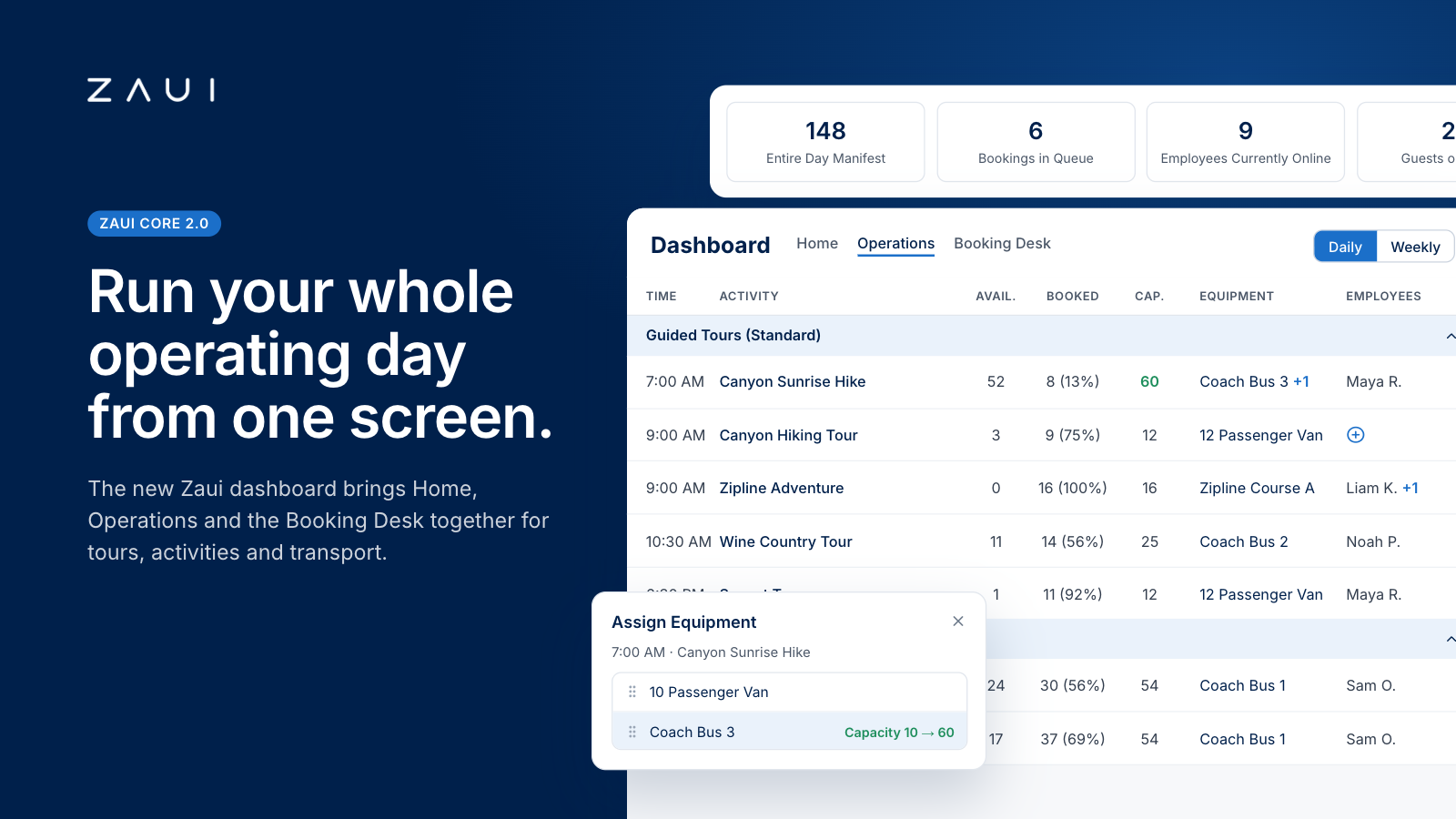
Zaui's new dashboard is a single command center for tour, activity and ground transportation operators. It combines three workspaces in one place: Home for your live business pulse, Operations for running every departure, and the Booking Desk for taking reservations fast.
Key takeaways
- The Operations Dashboard shows every departure for the day or week on one screen, with availability, booked percentage, capacity, assigned equipment and assigned staff on each row.
- You assign vehicles, equipment, guides and drivers right on the departure row, and capacity, availability and booked percentage recalculate instantly.
- Exception filters surface what needs attention first: sold-out or paused departures, departures nearing capacity, cancelled activities, and departures with no equipment or no staff assigned.
- Stop Sale pauses new bookings without touching existing ones, so you can fix a problem, like a broken-down bus, before a single guest is cancelled.
- Named Views let you save layouts, assign them to user types and set them as the default, so every team member opens Zaui to the view their job needs.
- One dashboard covers standard tours, interval time slots, rentals, tickets, resold supplier products and point-to-point transportation with timetables, stops, pickups and drop-offs.
- The redesigned Booking Desk cuts the staff booking flow from roughly five screens to two, with customer lookup, guest assignment, per-activity commissions, auto-calculated discounts and a visible dynamic pricing audit trail.
- The payoff is operational and financial: fewer tabs, errors and admin hours, plus more seats sold, fewer revenue leaks and pricing decisions you can trust.
What is an operations dashboard for tour, activity and transportation operators?
An operations dashboard is a live, single-screen view of every departure you run. It shows who is booked, how much capacity remains, which vehicles, equipment and staff are assigned, and what needs your attention next. A booking calendar tells you what has sold. An operations dashboard tells you what to do about it.
For tour operators, activity providers and shuttle companies, the dashboard is where booking data becomes a plan for the day. Your reservations team uses it to sell the right seats. Your operations manager uses it to staff and equip each departure, and your owner uses it to see whether today, this week and this season are on pace.
How an operations dashboard differs from a calendar or a report
ToolQuestion it answersWhen you use itWho uses it mostBooking calendarWhat has sold, and when?When taking or checking a bookingReservations and guest servicesReportWhat happened, and why?Weekly, monthly or at season endOwners, finance and marketingOperations dashboardWhat is happening now, and what do I do next?All day, every dayOperations managers, dispatch, front desk and owners
What a modern operations dashboard should show
At a minimum, a dashboard built for tours and transportation should give you:
- Every departure for the day or week, sorted by time, with seats available, seats booked and total capacity.
- The vehicles, boats, equipment, guides and drivers assigned to each departure, and the ability to change them without leaving the screen.
- Exceptions first: departures with no staff, no equipment, almost no seats left, or sales paused.
- Instant actions such as pausing sales, cancelling a departure, notifying booked guests or adding a booking.
- One-click access to the manifest for any departure or for the whole day.
- A comparison with the same day, week, month and year last season, so you know whether you are on pace.
If you want a refresher on the terms used in this guide, see Zaui's tour operator booking software glossary. For a deeper look at the resource side, read how resource scheduling works for activity operators.
Why it matters more every season
The experiences market is large and still growing. Arival and Phocuswright value the global experiences market at $271 billion in 2025, and their forecast, reported by Travel Weekly, puts it at $342 billion a year by 2029. The same research found that just 33% of bookings are made online today, with online sales projected to reach 43% of the market by 2029.
More bookings arriving through more channels means more moving parts on the ground. Every OTA booking, phone reservation and walk-in still needs a seat, a vehicle, a guide and a pickup. The operators who stay ahead are the ones who can see all of it at once and act on it in seconds.
Why most booking-system dashboards fall short
Most booking platforms were built to sell first and operate second, and their dashboards show it. They are good at listing what has been booked. They are much weaker at helping you run the day those bookings create.
When we reviewed how leading booking platforms describe their dashboards, manifests and resource tools, most of the published material covered one feature at a time: a waitlist, a printable manifest, a widget board or a resource-allocation rule. Several of the most visible manifest and dashboard guides in the category date back to 2018 and 2020. Very few show how a dashboard runs a full operating day across tours, rentals and transportation in one place.
Here is where traditional dashboards tend to break down.
They report, but they do not act
A traditional dashboard shows you a departure with 11 of 12 seats booked. To add a second vehicle, assign a driver or pause sales, you leave the dashboard, open another module, find the departure again and make the change. Each hop is small, but across dozens of departures and a full season it adds up to hours of clicking and more chances to change the wrong thing.
Assignments live somewhere else
When your booking system cannot show who is driving or guiding each departure, that information moves to spreadsheets, whiteboards and group chats. Those copies drift out of date the moment a booking changes. The result is the classic morning scramble: a guide double-booked, a van committed twice or a departure with nobody assigned at all.
Transportation is an afterthought
Many dashboards were designed around a single tour leaving from a single meeting point. Shuttle and transfer operators need much more: timetables, multiple stops, pickup and drop-off counts per stop, seat types and vehicle details. When those are missing, transport teams end up running a second system on the side.
Everyone sees the same screen
A guide, a reservations agent and an owner need different information. A one-size-fits-all dashboard either buries each of them in detail or hides what they need behind extra clicks. Seasonal staff feel this most, because they have the least time to learn where everything lives.
Pausing sales and cancelling are the same blunt tool
When a bus breaks down or the weather turns, you often need time before you know whether a departure will run. If your only option is to cancel, you trigger refunds and notifications for guests you may not need to disturb. If you do nothing, new bookings keep arriving for a departure that might not happen.
Insight arrives after the season
Reports are essential, but they look backwards. If you only see your pace against last year at month end, you lose the chance to add capacity, adjust prices or push marketing while it still matters.
Zaui's new dashboard was designed to close each of these gaps. If you are comparing platforms head to head, the tour operator software comparison and the Zaui comparison hub break down the differences platform by platform.
Introducing Zaui's new dashboard: what it shows and how it works
Zaui's new dashboard is the front door to Zaui Core 2.0, the next generation of the Zaui platform for tour, activity and transportation operators. It organizes your back office into three tabs, Home, Operations and Booking Desk, so the information you check most and the actions you take most sit one click apart.
The new experience is rolling out to Zaui operators now. A banner invites each user to try it, and a Classic View button lets anyone switch back at any time during the transition. Everything familiar is still there; it is simply organized to be faster.
Home: your business at a glance
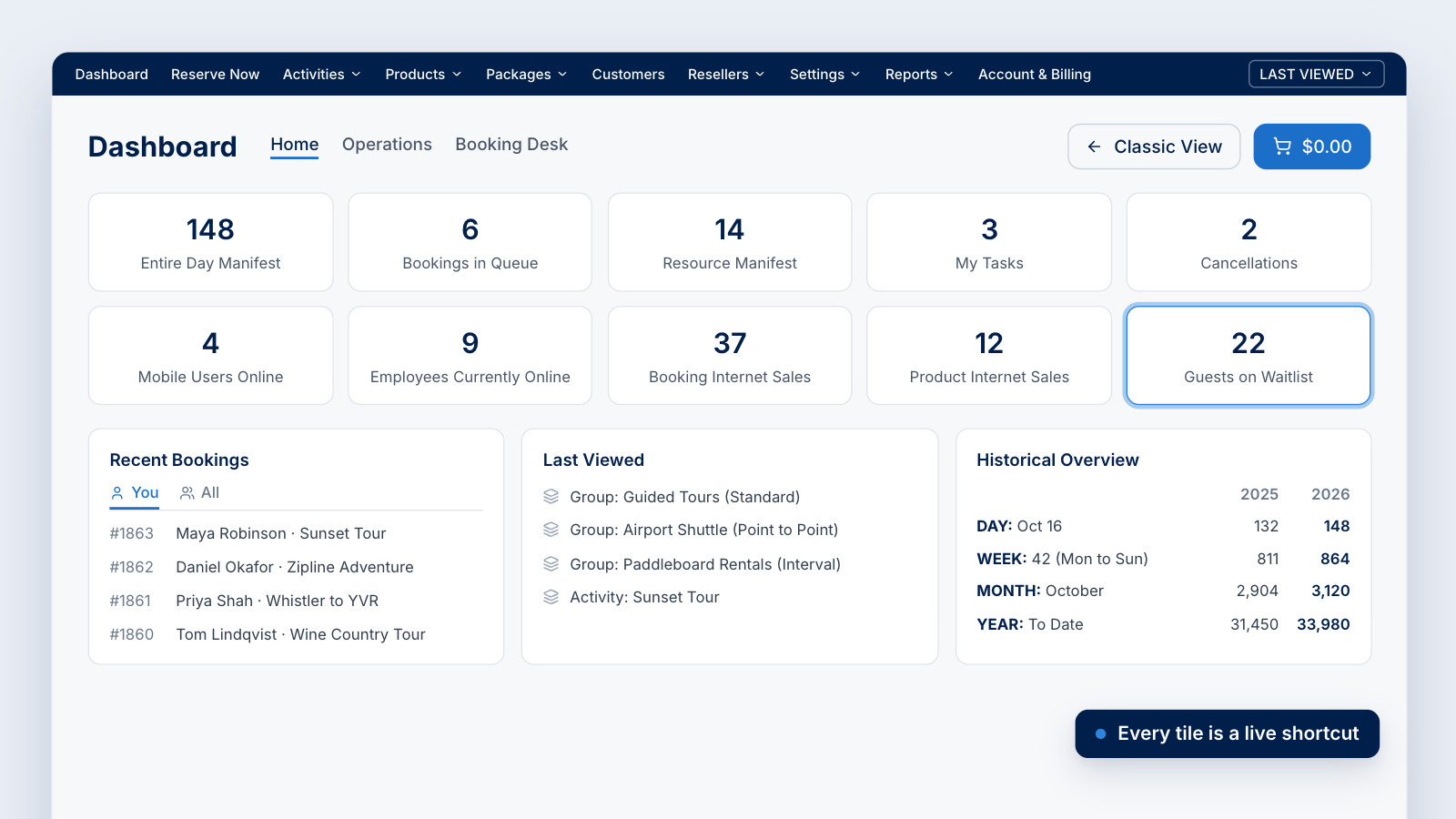
The Home tab answers the first question of every operating day: what is going on right now? It opens with a row of live tiles that double as shortcuts:
- Entire Day Manifest: every guest traveling today, across all products.
- Bookings in Queue and My Tasks: work waiting for you and your team.
- Resource Manifest: what your vehicles, equipment and staff are committed to.
- Cancellations: cancelled bookings you may need to act on.
- Mobile Users Online and Employees Currently Online: who on your team is active right now.
- Booking Internet Sales and Product Internet Sales: what is selling online.
- Guests on Waitlist: demand you have not captured yet.
Information that used to sit in the sidebar now lives here, and each tile becomes a quick link as data comes in. Below the tiles, three panels keep you oriented:
- Recent Bookings switches between bookings you made and bookings made by anyone with back office access. A guest services lead can review their own work and their teammates' in one place.
- Last Viewed takes you straight back to the products and activities you were working on.
- Historical Overview compares today, this week, this month and year to date with the same periods last year, so you can read your pace at a glance.
Bookings with a balance owing also surface on Home, so unpaid revenue never hides in a report.
The waitlist, one click from Home
Selecting Guests on Waitlist opens a full waitlist view. You see every guest who joined a waitlist, the activity and departure they want, their party size, their position, their status, when they joined and when their offer expires. You can search by guest, email, booking or activity and filter by date and status.
When inventory becomes available, standby bookings are processed before automated waitlist entries. To see how waitlist offers turn into paid bookings without anyone calling down a list, read how Zaui's automated waitlist fills sold-out spots.
Booking Desk: sell faster at the phone and the counter
The Booking Desk is where your team books on behalf of guests: phone calls, walk-ins, hotel concierges and dock or desk sales. Zaui rebuilt it so the booking keeps pace with the conversation.
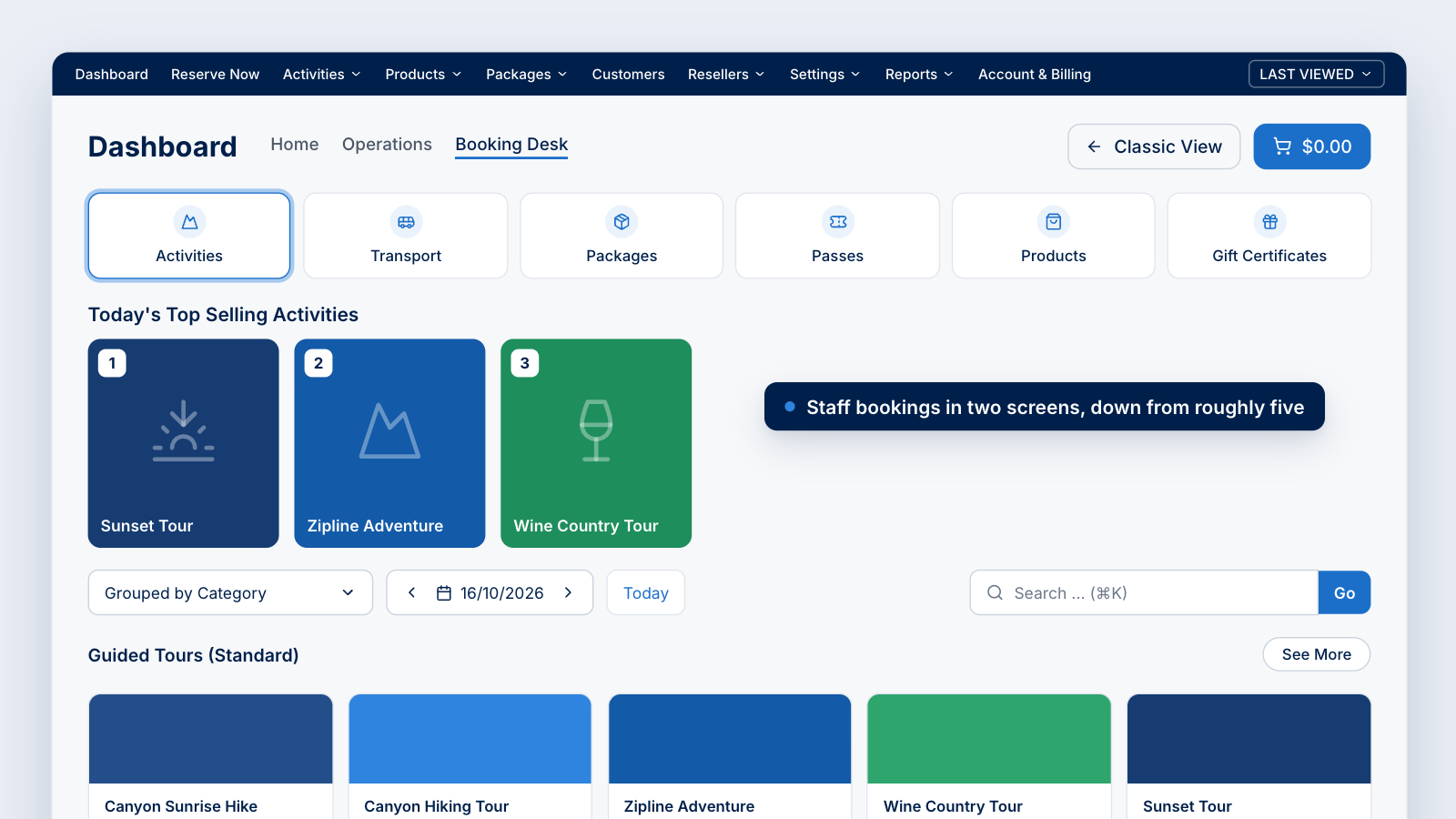
Product tabs at the top take you to Activities, Transport, Packages, Passes, Products and Gift Certificates. Below them, Today's Top Selling Activities shows what is moving on the date you select, and that date becomes your booking date. You can group and search products the same way you filter the Operations Dashboard, and image-led product cards make it easy to steer a caller to the right experience.
The booking flow itself has been redesigned from roughly five screens to two. On those two screens your team can:
- Select passengers by type, choose the date and time, and add a note for an allergy or a special occasion.
- Use Customer Lookup to find a returning guest and add the booking to their existing profile, with booking questions and custom fields prefilled.
- Name a reservation group to keep people traveling together organized.
- Add internal notes that are never shown to the guest, in notifications or in their profile.
- Use guest assignment to put one group on different activities in a single booking. If half the family wants to zipline and the other half wants a wine tour, you no longer need two bookings.
- Assign commission per activity to a specific company and agent, so two agents who sold different parts of one booking are each credited correctly.
- Apply a promo code or a discount with a reason code. The discount amount calculates automatically, so nobody does mental math on the phone.
- Take payment by cash, credit card, gift certificate or voucher, or mark the booking to be paid so it is created with a balance owing.
After the booking: tickets, changes, refunds and a full audit trail
Once a booking is processed, its summary page brings every follow-up action together. You can print tickets one per passenger or one for the whole group, which matters when a single booking covers 20 people. You can send a notification from your saved templates, edit the booking to remove an item or add a payment, or choose Cancel & Refund or Cancel Without Refund.
Refunds follow your policy automatically. When a cancellation fee applies, Zaui deducts it before showing the refund amount, and you record the refund type, reason, note and the company or agent who requested it. Card refunds reference the original card transaction, and the payment summary lists every transaction and the remaining balance. Pair this with Zaui's booking policy toolkit to set cancellation rules once and apply them every time.
The booking history is one of the most useful upgrades. It records every change, and when dynamic pricing has adjusted a price, it shows which rule fired, the parameters behind it, each adjustment and the price before and after. In Zaui's walkthrough, a weekend multiplier added $50 and an activity-specific multiplier added $10, for a total change of $60, visible line by line.
Express Book: a booking without the full checkout
For the fastest bookings, the shopping cart icon on any departure in the Operations Dashboard or on the Booking Desk opens Express Book, also called Quick Add. It is the same booking flow condensed into one panel, with customer lookup, passenger counts, booking questions, pickup location, add-ons and commission. You can book and pay now, book with payment to follow, or continue to the full checkout. Zaui built Express Book to reduce booking time by up to 70%.
For more on how reservation teams use these tools, see Zaui's back office booking system and the Zaui Booking Desk guide.
Inside the Operations Dashboard: how it works, step by step
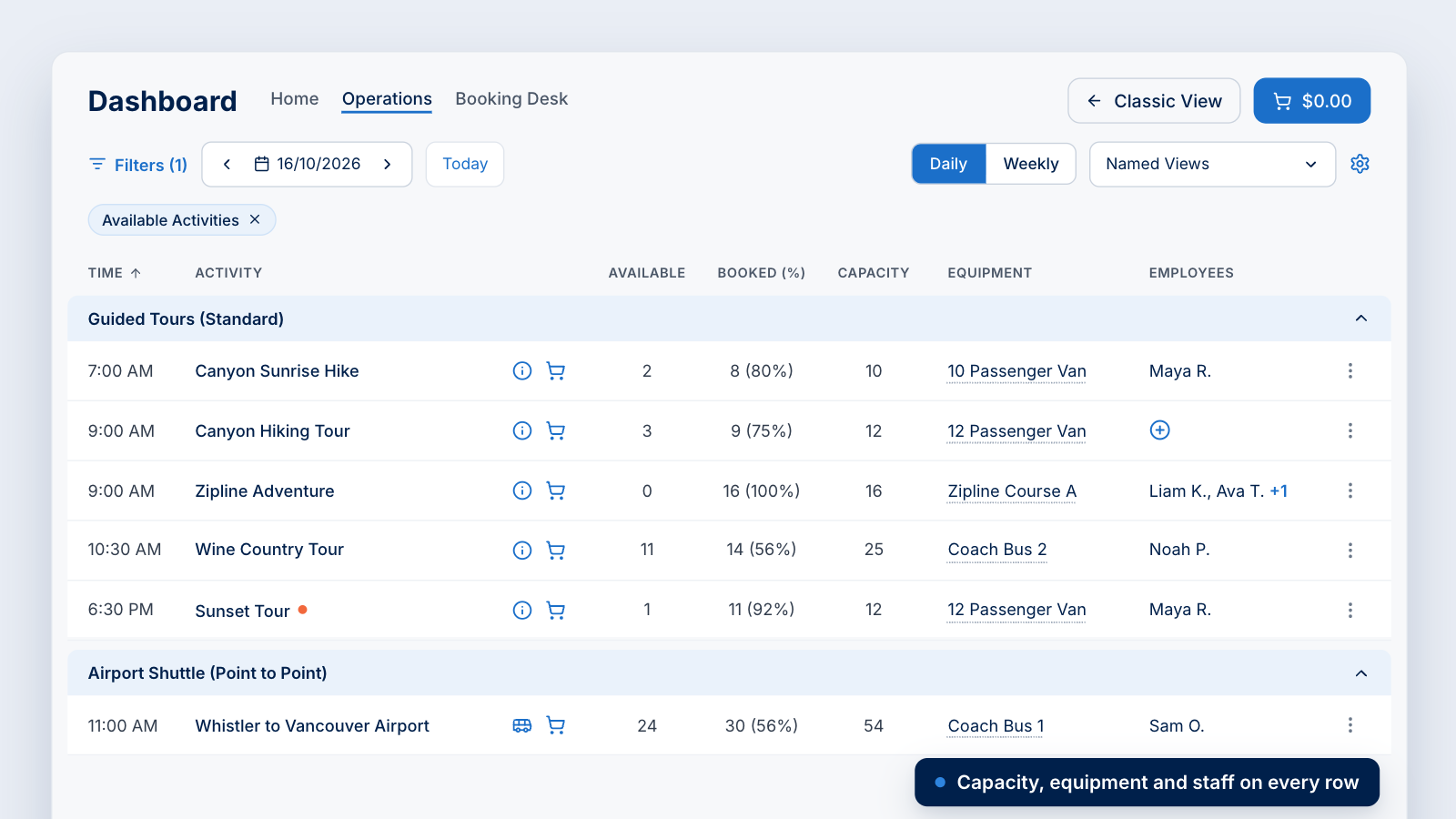
The Operations Dashboard opens on today's departures in a daily view. Each row is one departure, and every action you need for that departure sits on the same row, so you can read the day and change it without leaving the screen. Here is how it works.
Step 1: Pick your day or your week
Use the date picker to jump to any date and the Today button to come straight back. Switch between the Daily view and the Weekly view, which shows up to seven days at a time. In the weekly view you can choose any run of dates within a seven-day window, and Zaui breaks it down day by day.
Step 2: Read the departure row
Every row gives you the essentials at a glance:
- Departure time and an optional short code.
- The activity name, an information button and a quick add button for an instant booking.
- Available, Booked (%) and Capacity, so you see seats left, seats sold and how full the departure is.
- Equipment and Employees, showing what and who is assigned.
- A more-actions menu for secondary tasks, kept out of the way so the row stays clean.
Departures are grouped by category and sorted by time. If you would rather see one continuous timeline, hide categories and every departure sorts purely by departure time.
Step 3: Filter to what needs attention
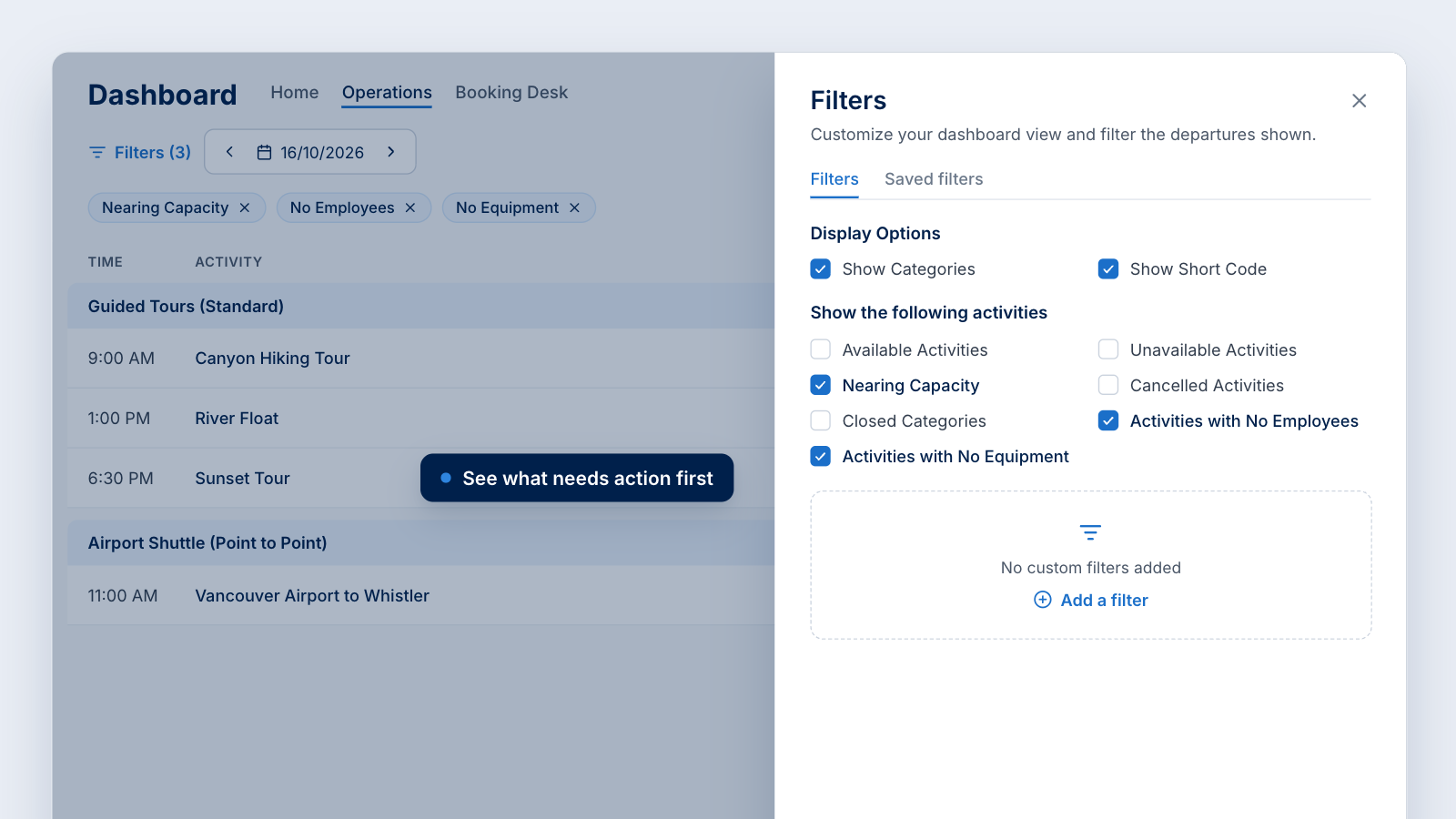
The Filters panel is where the Operations Dashboard turns from a list into a control room. Display options let you show or hide categories and short codes. Activity filters let you choose exactly which departures appear:
- Available activities that are open for sale.
- Unavailable activities that are sold out or on a stop sale.
- Nearing capacity departures that are close to full.
- Cancelled activities.
- Closed categories.
- Activities with no equipment assigned.
- Activities with no employees assigned.
You can add your own filters on top, save them and reuse them any time. A morning check of no employees and no equipment catches unstaffed departures before guests arrive. A midday check of nearing capacity shows you where to add a vehicle or open more seats.
Step 4: Answer guest questions without leaving the screen
Select the information button on any departure to open its activity panel: departure and arrival times, duration, an icon for the activity type, the description, notes and restrictions, and any additional information. Everything comes from your activity settings, so it stays current and fully customizable. Guest services and reservations staff can answer a caller's question in seconds instead of hunting through product pages.
Step 5: Assign vehicles, equipment and staff in place
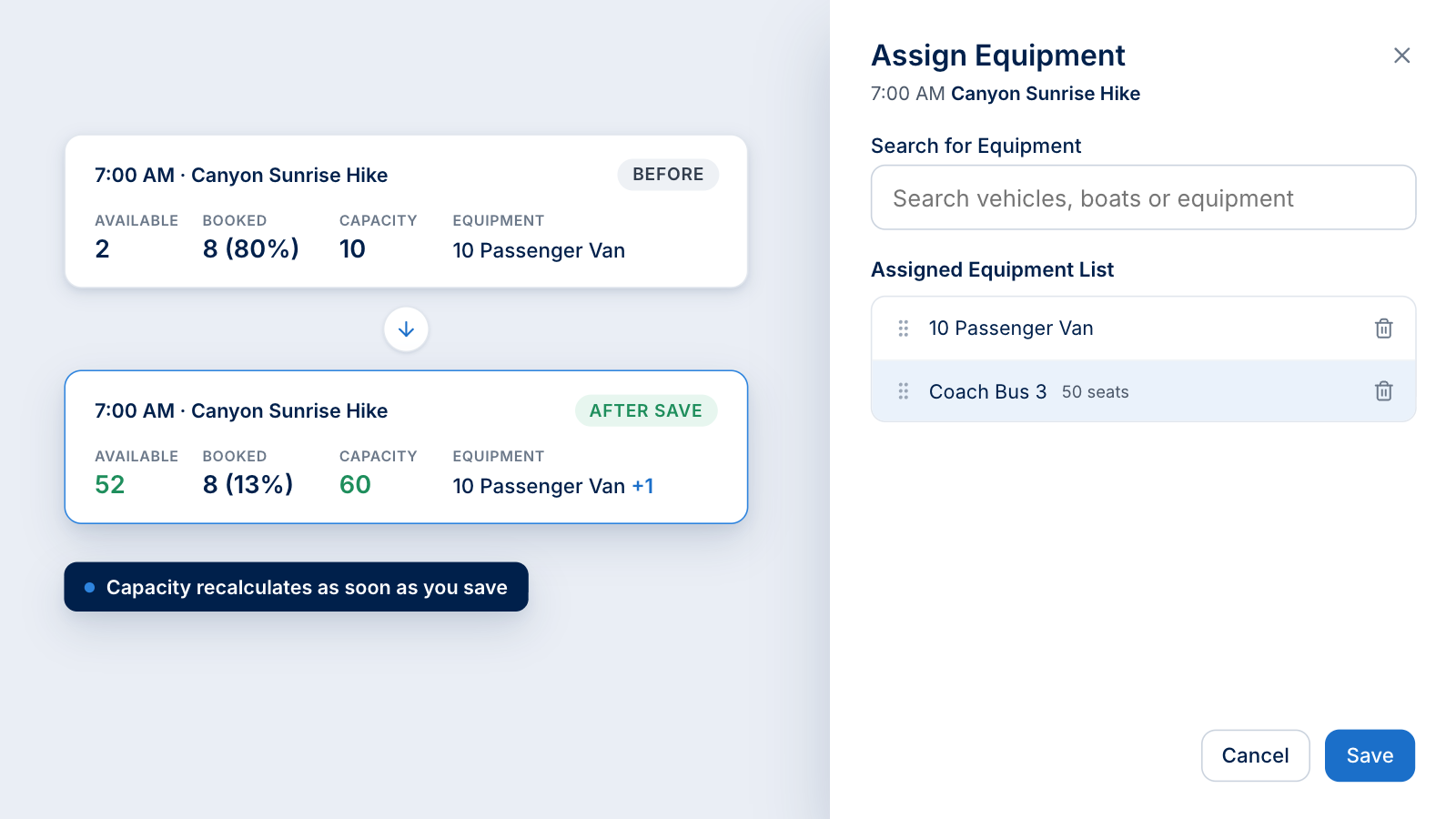
Select the equipment field on a departure to open Assign Equipment. Search for a vehicle, boat or piece of equipment, add as many as you need and drag them into the order you want. Availability, capacity and booked percentage recalculate as soon as you save. In Zaui's walkthrough, adding a bus to a departure that had been running with a 10-passenger van lifted its capacity from 10 seats to 60 on the spot.
Employees work the same way. Open Assign Employees, search for a guide or driver and assign them. The row shows up to two names and a counter for any additional staff. For activities that use a maximum capacity instead of assigned equipment, an Update capacity link lets you change the number directly from the row.
Behind these controls sits Zaui's scheduling and resource assignment engine, which checks availability in real time so the same vehicle or driver is not double-booked.
Step 6: Act on a departure
The more-actions menu on each row holds the tools you reach for when plans change:
- Send Notification to everyone booked on the departure. It becomes active as soon as the departure has bookings.
- Add Note to leave an internal note for your team, with the option to display it at the time of booking. A small orange dot flags departures that carry a note, and every staff member can see it.
- Stop Sale and Restart Sale to pause and resume new bookings.
- Cancel Activity and Restore Activity to cancel or reinstate a departure.
- Move Bookings to shift guests between time slots on interval activities.
Step 7: Know when to stop sales and when to cancel
This distinction protects both your guests and your revenue.
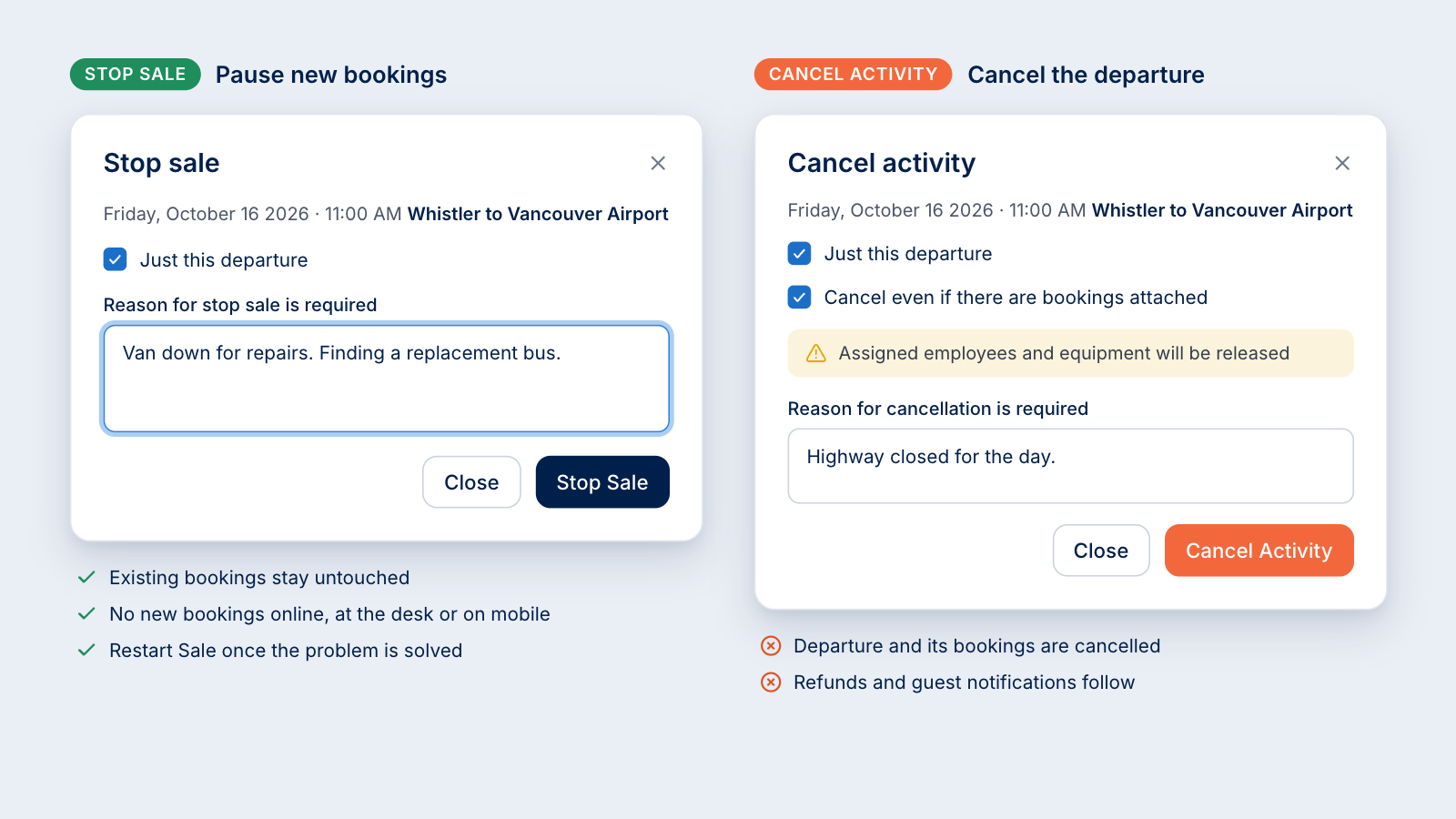
Stop Sale blocks new bookings from your guest services team, your mobile users and your online booking engine, but it does not touch existing bookings. Use it when you need time: a bus has broken down, you are looking for a replacement, and you do not know yet whether the departure will run. You record a reason, apply it to just this departure, and restart sales the moment the problem is solved. Once sales resume, the departure is fully bookable again with every restriction removed.
Cancel Activity cancels the departure itself, including any bookings attached to it, and starts a chain of follow-up work: cancelling those bookings, issuing refunds and notifying guests. Zaui asks you to confirm whether to cancel even if bookings exist, requires a reason, and releases the assigned employees and equipment so they can be used elsewhere.
For transport operators, Zaui's guide to managing service disruptions goes deeper on planning for the days when things go wrong.
Step 8: Manage time slots and interval products
Interval activities, such as timed entries or products that run every hour, appear as a parent with each time slot nested underneath. Expand the parent to see every slot, or select Manage All to view each slot and the largest space available in it. Activity information stays consistent across the slots, bookings appear on the right slot as they arrive, and you can move guests between time slots in a few clicks.
Step 9: Run point-to-point transportation with timetables
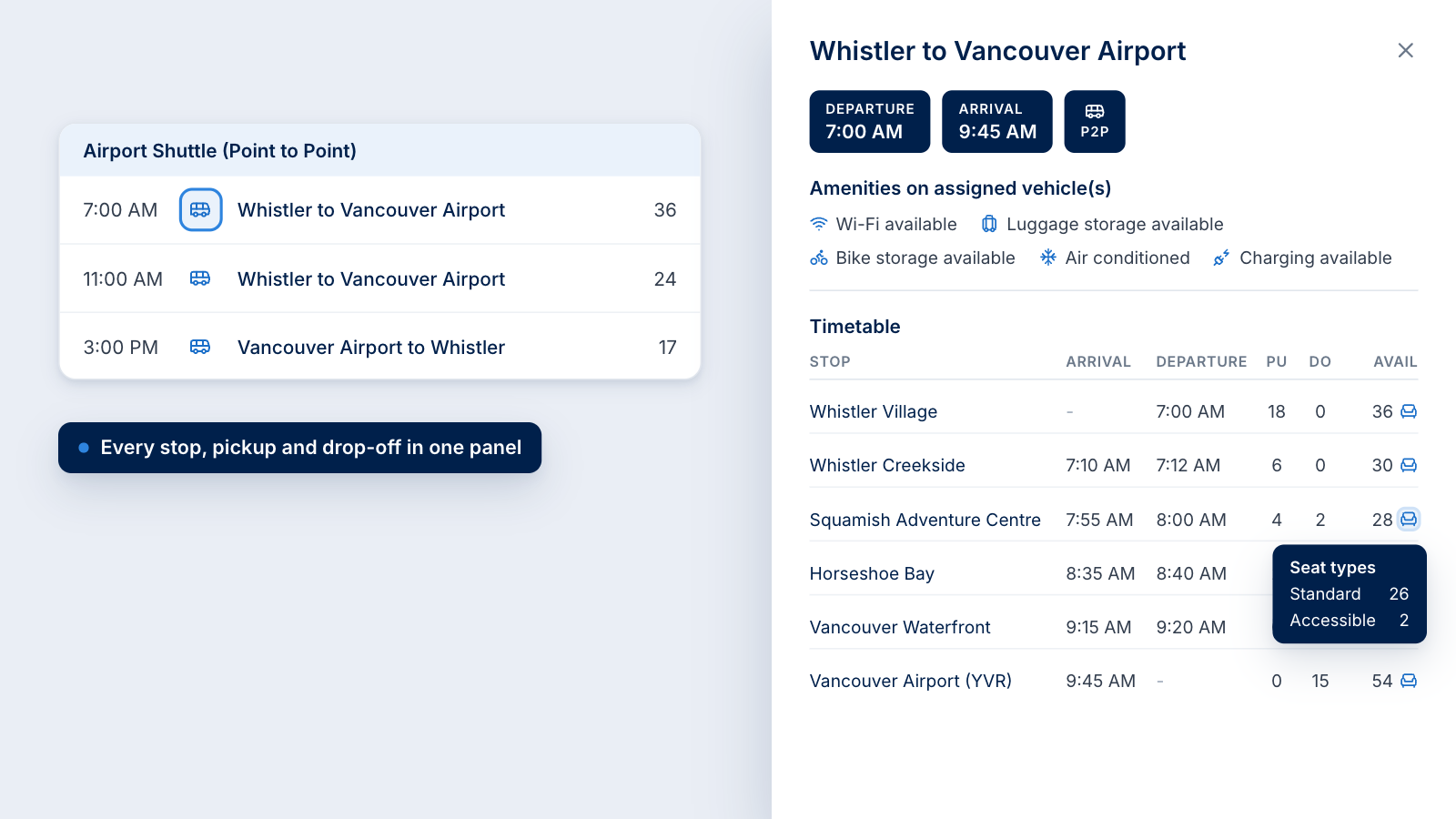
Point-to-point routes show a bus icon. Select it to open the route panel, which lists the amenities on the vehicles currently assigned, such as Wi-Fi, luggage storage, bike storage, air conditioning and charging. Below that is the full timetable: every stop with its arrival and departure time, pickups, drop-offs and seats available. Hover over the seat icon to see the breakdown of seat types.
This view is available for point-to-point products set up with timetables. Rentals and ticketed products sit in their own categories in the same dashboard, so your shuttle desk and your rental counter work from one screen.
Step 10: See the products you resell
If you resell activities run by other operators, they appear in your dashboard too, marked with a remote activity icon. Because the supplier owns and operates the activity, its capacity, equipment and employees are managed by the supplier rather than by you. You still see the departures and can sell them alongside your own products.
Step 11: Plan the week with color coding
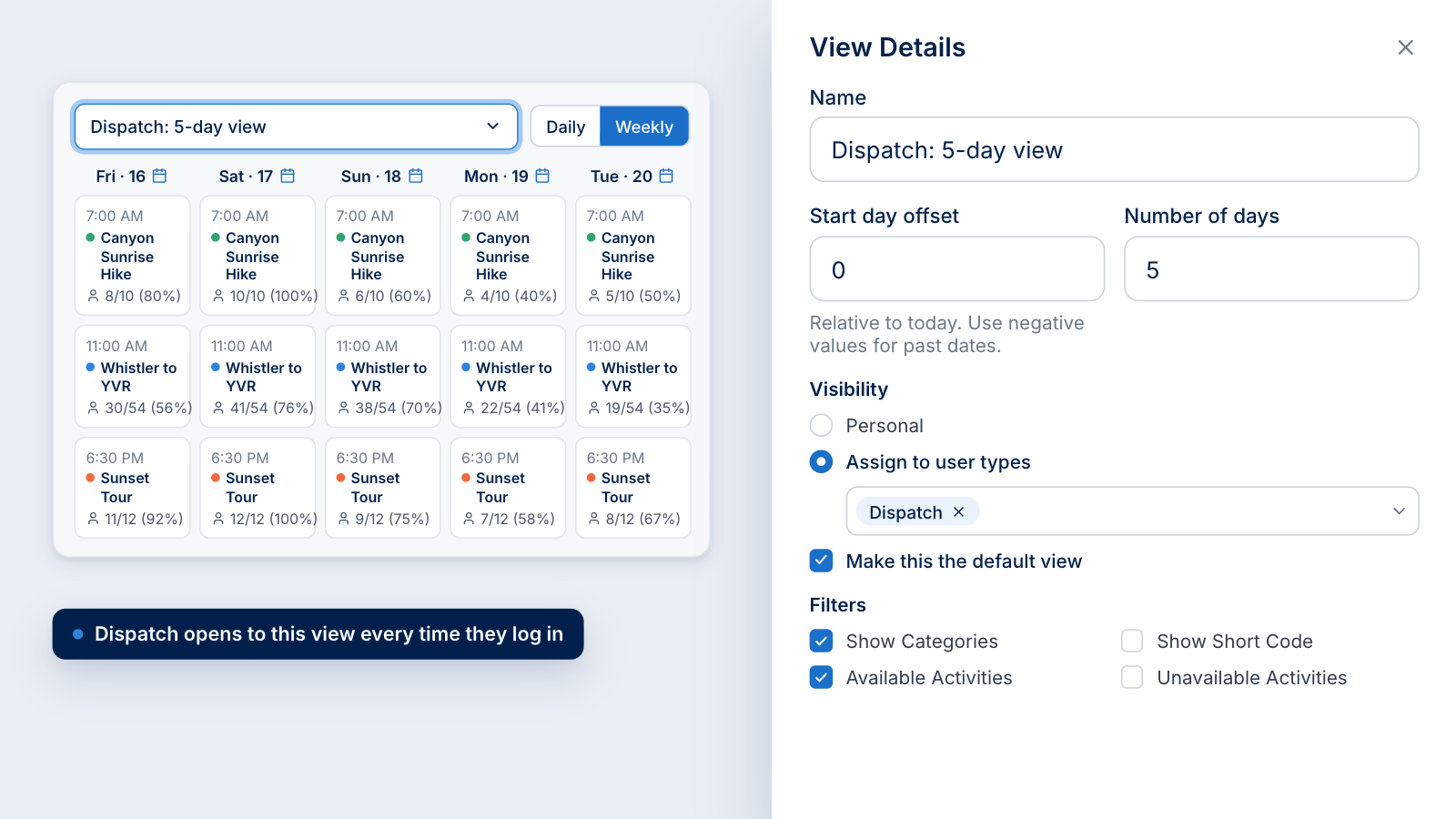
The weekly view gives you the same capabilities as the daily view across up to seven days, with each departure shown as a card with its time, activity, seats booked against capacity and percentage full. When every card looks the same, scheduling gets hard, so Dashboard Settings lets you assign a color to any activity. Your sunset tour, your airport shuttle and your rentals become instantly recognizable across the week, and adding equipment and employees works exactly as it does in the daily view.
Step 12: Save Named Views for every role
Once a layout works, save it as a Named View. You give it a name, set a start-day offset relative to today (negative values reach back into past dates), choose the number of days and pick the filters it applies. You can keep it personal or assign it to user types, and you can make it the default. Assign a five-day view to your dispatch team as their default, and every time one of them logs in, that is the view they see.
Step 13: Open any manifest in one click
In the weekly view, the calendar icon on any day opens the entire day manifest. From any departure, you can open its passenger list, which shows the assigned employees and vehicles, capacity, seats available and booked, the breakdown of adults, seniors, children, youth and infants, and the amount due.
Each guest line carries check-in, confirmation number, name and contact, party size, pickup time and location, drop-off location, comments, an unaccompanied minor flag, payment method and balance. Columns are fully customizable and resizable, you can download the report, and you can send a notification to the whole list from the same screen. Read more on handling unaccompanied minor bookings and mobile ticket scanning at check-in.
A day in the life: running a full operation from one dashboard
Here is how a multi-product operator might run a busy summer Saturday with Zaui's new dashboard. Picture a mountain-town business with guided tours, a paddleboard rental shop and an airport shuttle. The times are illustrative; the workflow is exactly how the dashboard works.
- 6:30 AM, the morning check. You log in and your default Named View loads: today plus the next two days, filtered to your own products. The Home tab shows the bookings in queue, the overnight cancellations, the guests on your waitlist and the employees already online.
- 6:40 AM, exceptions first. On the Operations tab you filter to activities with no employees and no equipment. The 9:00 AM canyon tour has no guide and the 11:00 AM airport run has no vehicle. You assign both from the departure rows in under a minute, and capacity updates as you go. Nera AI, Zaui's built-in operations intelligence, can flag unassigned departures days in advance, so mornings like this get quieter over time.
- 7:15 AM, a vehicle goes down. Your driver reports a mechanical problem on the van for the 10:30 AM shuttle. You put that departure on Stop Sale with a short reason. Existing passengers are untouched, and no new bookings arrive while you find a replacement. Twenty minutes later you assign a spare bus, capacity jumps and you Restart Sale. Nobody was cancelled.
- 8:30 AM, the phones start. A returning guest calls. Your agent finds her with Customer Lookup, and her details and booking answers prefill. Her family wants to split up: two on the zipline and two on the wine tour. Guest assignment puts all four on one booking, the agent applies a promo code, the discount calculates itself and the booking is marked to be paid.
- 10:00 AM, demand spikes. The nearing capacity filter shows the sunset tour is almost full. You add a second vehicle, open more seats and let your dynamic pricing rules do their job, and the new seats become available to guests on that tour's waitlist.
- 12:00 PM, the rental rush. Your hourly paddleboard slots are filling unevenly. You open Manage All on the interval product, see the largest space available in each slot, and move a group that asked for a later start into the 2:00 PM slot, freeing the busy 1:00 PM slot for walk-ins.
- 3:00 PM, a pickup changes. Construction closes the hotel driveway for the 5:00 PM shuttle. From the passenger list, you send one notification to everyone on that departure with the new pickup point, and every guest gets the same message at the same time.
- 6:00 PM, the close. On Home, the Historical Overview shows today and this week against last year. You review the cancellations, check the bookings with a balance owing and open the color-coded weekly view to plan tomorrow's staff and vehicles.
Every step happened inside one dashboard, without a spreadsheet, a whiteboard or a second system.
Operational gains: time, accuracy, staffing and guest experience
Zaui's new dashboard saves time exactly where tour and transport teams lose it: switching screens, chasing assignments, fixing errors and answering the same question twice. Here is what changes on the ground.
Fewer screens and fewer clicks
The biggest gains come from putting the action next to the information. On the Operations Dashboard you assign a driver, add a vehicle, pause sales, leave a note or notify guests from the departure row itself. On the Booking Desk, a staff booking that used to take roughly five screens now takes two, and Express Book condenses a quick booking into a single panel.
TaskTypical booking-system workflowWith Zaui's new dashboardAssign a driver to a departureLeave the dashboard, open the resource module, find the departure, assign, returnSelect the Employees field on the departure rowAdd a second vehicle when a tour fillsEdit the product or schedule, then recheck capacityAdd the vehicle on the row; capacity recalculates instantlyPause bookings during a breakdownClose availability by hand, or cancel and refund everyoneStop Sale with a reason; existing bookings stay untouchedTell every passenger about a pickup changeExport the manifest, then email or call guests one by oneSend one notification from the passenger listFind every unstaffed departureScan the schedule line by lineFilter to activities with no employeesBook a group that splits across activitiesCreate two or more separate bookingsOne booking with guest assignment
Scheduling without spreadsheets
When vehicles, equipment and staff are assigned in the same place guests are booked, the spreadsheet copy disappears, and so do its errors. Zaui's scheduling and resource assignment tools are built to cut time spent on scheduling by up to 50%, with real-time checks that keep any vehicle or driver from being double-booked. For more on the mechanics, see Zaui's guide to resource assignment.
Managing by exception
Most departures on most days run as planned. The exception filters let your team set those aside and focus on the few that need a decision: no guide, no vehicle, nearly full, sold out, paused or cancelled. Add Nera AI, which watches your booking data and flags problems such as a departure with no guide assigned while there is still time to fix them, and your team moves from firefighting to prevention.
Faster onboarding for seasonal staff
Many tour and transport operators hire and train a new team every spring. Named Views mean a new hire's first login opens on the view their role needs, already filtered and already set to the right date range. A consistent, guided booking flow means less to memorize and fewer first-week mistakes, so managers spend less time training and more time running the operation.
Cleaner handoffs and fewer errors
Internal notes travel with the departure and the booking, visible to every staff member and never shown to guests. The activity panel puts restrictions and details in front of whoever is on the phone. The passenger list carries pickup points, comments, unaccompanied minor flags and balances owing, so the driver, the guide and the front desk all work from the same facts.
A better guest experience
Operational speed shows up on the guest side. Callers wait less because bookings take fewer screens. Passengers hear about a pickup change in one message instead of a string of phone calls, and departures that hit a snag are paused rather than cancelled while you solve the problem. Pair the dashboard with automated guest communication and live vehicle tracking for passengers, and guests know what is happening before they need to ask.
Less time on reporting
Operational data that is clean at the source is faster to report on. TourExpress.ca, a shuttle operator connecting Montreal, Ottawa, Gatineau and Montreal-Trudeau Airport, cut its government reporting time by 75%, from three or four days to under a day, using Zaui's reporting and analytics (read the TourExpress.ca story). Zaui includes more than 135 pre-configured reports, plus scheduled reports and flexible data exports.
Revenue gains: utilization, pricing, upsells, channels and cash flow
Every operational improvement in the new dashboard has a revenue twin. When you can see capacity, staff and demand in real time, you sell more of the seats you already have and leak less of the revenue you have already earned.
Sell the seats you already have
An empty seat on a departure that runs anyway is revenue you can never get back. The nearing capacity filter shows which departures are about to sell out while there is still time to add a vehicle, and adding one on the row lifts capacity instantly. The unavailable filter shows what is sold out or paused, so nothing stays closed longer than it needs to.
Small gains compound fast. The table below is a simple illustration, not a forecast: it shows what selling just one extra seat per departure is worth over a season.
Turn sold-out demand into bookings
A guest on a waitlist is revenue waiting for a seat. The Guests on Waitlist tile keeps that demand visible on Home, and Zaui's automated waitlist offers newly opened seats to the next guest whose whole party fits, with a secure checkout link. Late cancellations on sold-out departures become new bookings instead of empty seats.
Protect revenue when something goes wrong
Cancelling a departure refunds every guest on it. Stop Sale gives you a middle path: you freeze new bookings, keep every existing one and buy time to find a replacement vehicle or wait out the weather. Each departure you save instead of cancelling keeps its revenue, its reviews and its guests' trust. When a cancellation is unavoidable, your cancellation fee is deducted automatically, so the revenue your policy protects is actually kept.
Price with confidence
Pricing is the strongest profit lever most operators have. McKinsey's classic analysis, The power of pricing, found that for the average company in the S&P 1500, a price rise of 1 percent with stable volumes would generate an 8 percent increase in operating profits. The obstacle has always been trust: teams hesitate to use dynamic pricing when they cannot see why a guest paid what they paid.
Zaui's booking history removes that doubt by showing every rule that adjusted a price, its multiplier and the price before and after. Your team can explain any price to any guest, and you can refine your rules with evidence. Learn how to build those rules in Zaui's dynamic pricing guide for tour operators, and why revenue is an operations problem.
Sell more in every conversation
Phone and desk bookings are your best chance to upsell, because the guest is already engaged and asking for help. The Booking Desk's multi-activity cart, add-ons, packages, passes and gift certificates make it natural to offer the second activity or the airport transfer. Today's Top Selling Activities nudges staff toward what is moving, and guest assignment lets a group that wants different experiences book them all at once.
Speed matters too. Online, the Baymard Institute reports that 17% of US online shoppers have abandoned an order because of a too long or complicated checkout. On the phone, the equivalent is a caller who hangs up and books elsewhere. A two-screen flow keeps the sale moving.
Keep the guests you win
Customer Lookup attaches every booking to the guest's existing profile, so your team recognizes returning guests and your data shows who comes back. That matters: research by Frederick Reichheld of Bain & Company, cited in Harvard Business Review, found that increasing customer retention rates by 5% increases profits by 25% to 95%. Zaui's customer profile and self-serve tools and its guide to getting more repeat customers show how to turn that into a habit.
Collect what you are owed
Revenue you have earned but not collected is still at risk. Bookings with a balance owing surface on Home, to-be-paid bookings carry their balance until settled, and refunds record the original transaction, the fee deducted and the reason. Commission is assigned per activity and per agent, so reseller and agent relationships stay accurate and disputes stay rare. If you sell through partners, see how Zaui's agent and reseller portal and channel manager keep one inventory across every channel.
Decide with data while it still matters
The Historical Overview on Home compares today, this week, this month and year to date with last year, so you can spot a soft week early and act on it. McKinsey's research on how customer analytics boosts corporate performance found that intensive users of customer analytics were 23 times more likely to clearly outperform competitors in new-customer acquisition, and that customer-analytics champions were almost 19 times more likely than laggards to achieve above-average profitability. Zaui puts that analytics habit on the screen your team already opens every morning.
Built for complex operations: multi-product, multi-location, transportation and enterprise
Zaui's dashboard is built for operators whose days do not fit a single calendar. That is what makes it the most advanced operations dashboard in the category: it runs tours, activities, rentals, tickets and ground transportation side by side, for teams of any size, from one screen.
Every product type in one view
Most operators sell more than one kind of product, and each kind behaves differently. Zaui's Operations Dashboard shows them together and handles each on its own terms:
- Scheduled tours and activities with seats, equipment and guides.
- Interval products with nested time slots and the ability to move guests between them.
- Rentals such as bikes and paddleboards, priced per person or per piece of equipment.
- Ticketed products for attractions and events.
- Point-to-point transportation with timetables, stops, pickups and drop-offs.
- Packages, passes, products and gift certificates sold from the Booking Desk.
Whether you run sightseeing tours, rentals, multi-day tours or ferries and boat tours, the same dashboard adapts to how your product actually runs.
Transportation depth that tour-first platforms rarely match
Zaui was built for ground transportation as well as tours, and it shows. Route panels list every stop with pickups, drop-offs and seats available, plus vehicle amenities and seat-type breakdowns. Passenger lists carry pickup and drop-off locations and unaccompanied minor flags. Around the dashboard, Zaui adds live vehicle tracking for passengers and a GTFS feed that puts your routes on maps. Explore Zaui for shuttle businesses, airport shuttles and intercity bus routes.
Your products and your partners' products, together
Resold supplier products sit in the same dashboard as your own, clearly marked and managed by the supplier, so your desk can sell a partner's zipline next to your own shuttle. The Zaui Connect partner network, the agent and reseller portal and per-activity commissions keep every partner relationship accurate. For more, see how to sell tour packages through reseller channels as one product.
Built for teams, not just users
Named Views assigned by user type, Recent Bookings for you or for everyone, and live counts of employees and mobile users online give managers a clear picture of who is doing what. A large operation with many roles gets the same clarity as a two-person team.
Enterprise-grade data and intelligence
When your finance or leadership team needs more than a dashboard, Zaui goes further. Nera AI analyzes booking, sales and resource data and alerts you to problems before they reach guests. More than 135 pre-configured reports cover channels, passes, point of sale, resources, agents and finance.
Zaui DataBridge delivers a clean copy of your booking data every night to your own BI, finance, CRM or data warehouse tools, with ready-made transformations for Microsoft Power BI and Microsoft Dynamics 365. For larger operators, Zaui's enterprise booking software guide covers the full picture.
Proven by operators of every shape
Operators across tours and transportation run their days on Zaui. Reindeer Shuttle grew from two vans to a 16-vehicle fleet serving Purdue University, with bookings and check-in running through Zaui. IceWalks guides visitors onto the Athabasca Glacier in Jasper National Park. Prince of Whales, the largest family-owned whale-watching and eco-adventure company in BC, runs 15 boats from Vancouver, Victoria and Telegraph Cove. Browse more Zaui case studies.
Questions to ask in the demo
- Show me how you would handle a broken-down vehicle 30 minutes before departure.
- Show me every departure tomorrow that has no guide assigned.
- Show me a group booking where two guests do one activity and two do another.
- Show me how a seasonal agent's first login differs from a manager's.
- Show me the full timetable for a shuttle route with five stops.
If a platform needs three screens, a spreadsheet or a support ticket to answer any of these, it will need them every day of your season.
For a broader framework, read how to choose tour operator software and the tour operator software buying guide. If you are weighing specific platforms, see Zaui vs FareHarbor, Zaui vs Peek Pro, Zaui vs Rezdy, Zaui vs Checkfront and Zaui vs Bokun.
Frequently asked questions
What is Zaui's new dashboard?
Zaui's new dashboard is the redesigned command center of Zaui Core 2.0. It brings three workspaces together: Home for live business tiles and year-over-year comparisons, Operations for running every departure with capacity, equipment and staff on one screen, and the Booking Desk for fast staff reservations. It serves tour, activity and ground transportation operators.
What is the Zaui Operations Dashboard?
The Operations Dashboard is the Operations tab of Zaui's new dashboard. It lists every departure in a daily or weekly view with available seats, booked percentage, capacity, assigned equipment and assigned employees. You can assign resources, pause sales, cancel departures, add notes, notify guests and open manifests directly from each row.
What should a tour operator dashboard show?
A tour operator dashboard should show every departure with seats available, seats booked and capacity; the vehicles, equipment, guides and drivers assigned; exceptions such as unstaffed or nearly full departures; one-click manifests; quick actions like pausing sales; and a comparison with last year's pace. Zaui's dashboard covers all of these on one screen.
What is the difference between Stop Sale and Cancel Activity in Zaui?
Stop Sale blocks new bookings from staff, mobile users and your online booking engine while leaving existing bookings untouched, so you can solve a problem first. Cancel Activity cancels the departure and its bookings, starts refunds and guest notifications, requires a reason and releases the assigned employees and equipment.
Can I assign guides, drivers and vehicles from Zaui's dashboard?
Yes. Select the Equipment or Employees field on any departure to search for and assign vehicles, boats, equipment, guides or drivers. You can assign several and reorder them, and the departure's availability, capacity and booked percentage update instantly. Real-time checks keep the same vehicle or driver from being double-booked.
Does Zaui's dashboard work for shuttle and point-to-point transportation?
Yes. Point-to-point routes set up with timetables show every stop with arrival and departure times, pickups, drop-offs and seats available, along with the amenities on assigned vehicles and a breakdown of seat types. Passenger lists include pickup and drop-off locations and unaccompanied minor flags.
Can different team members see different views?
Yes. Named Views let you save a layout with its own filters, number of days and a start date relative to today. You can keep a view personal, assign it to user types and make it the default, so each role sees the right view as soon as they log in.
How does Zaui's dashboard help increase revenue?
It helps you sell more of the capacity you already have and protect what you have earned. The nearing capacity filter shows where to add vehicles, the waitlist tile keeps sold-out demand visible, Stop Sale avoids unnecessary cancellations, transparent dynamic pricing builds trust in your rates, and faster desk bookings make upselling easier.
Can I see products I resell from other suppliers?
Yes. Resold supplier activities appear in your Operations Dashboard with a remote activity icon. Capacity, equipment and employees for those departures are managed by the supplier, but you can see them and sell them alongside your own products.
Can I export dashboard data to my own BI tools?
Yes. Zaui includes more than 135 pre-configured reports and scheduled reports. Zaui DataBridge also delivers a clean copy of your booking data every night to your BI, finance, CRM or data warehouse tools, with ready-made transformations for Microsoft Power BI and Microsoft Dynamics 365.
Is the new dashboard available now?
Zaui's new dashboard is rolling out now as part of Zaui Core 2.0. During the transition, users can switch between the new experience and the Classic View at any time. To see it running on your own products and routes, book a demo with Zaui.
See the most advanced operations dashboard in tours and transportation
Zaui's new dashboard turns your back office into one command center. Home gives you the live pulse of your business, Operations lets you staff, equip and adjust every departure from a single row, and the Booking Desk takes reservations in two screens instead of roughly five. Together they remove the clicks, spreadsheets and errors that slow your team down, and they help you sell more seats, protect revenue during disruptions and price with confidence.
Zaui brings tours, activities, rentals, tickets, resold supplier products and point-to-point transportation into one live, actionable view. That breadth, combined with an action on every row, is why Zaui built it to be the most advanced operations dashboard in tours and ground transportation, and the best place to run a growing operation.
Ready to see it on your own products and routes? Book a demo with Zaui and walk through your busiest day, step by step. You can also review Zaui pricing or explore every platform feature.
Sources and further reading
External research cited
- Arival and Phocuswright, Travel Experiences 2026: Market Sizing, Operator and Consumer Behavior Highlights
- Travel Weekly, By 2029, travel experiences expected to be a $342B business
- McKinsey & Company, The power of pricing (2003)
- McKinsey & Company, Five facts: How customer analytics boosts corporate performance (2014)
- Harvard Business Review, The Value of Keeping the Right Customers (2014)
- Baymard Institute, Cart abandonment rate statistics (2026)
Zaui customer stories
- TourExpress.ca: technology-first transportation with Zaui
- Reindeer Shuttle: from two vans to a 16-vehicle fleet
- IceWalks: what 40 years on a glacier teaches you about business
- Prince of Whales: more partnered bookings with Zaui
Further Resources from Zaui
- Back office booking system built for busy reservation teams
- Automated waitlist for tour operators
- Resource scheduling for activity operators
- NERA AI operations alerting
- Booking data export with Zaui DataBridge
- Six key performance indicators every tour and activity company should measure
- Dynamic pricing for tour operators
- Shuttle and bus booking software: a practical guide
Related Posts


Frequently Asked Questions
No. Zaui’s pricing is fully pay-as-you-go. You aren’t locked into any long-term contract. In fact, leading platforms emphasize this flexibility. Similarly, Zaui lets you start and stop anytime. You can change or cancel your plan freely, so you only pay for what you use.
Absolutely not. Zaui’s pricing is 100% transparent. We disclose all fees up front with no surprise add-ons or “sneak-in” charges. In fact, Zaui’s plans include all core features “without additional fees”. Industry experts note that hidden fees undermine trust so we avoid them entirely. All costs are clearly outlined in our pricing, and there are no extra setup charges or undisclosed surcharges at checkout.
Zaui integrates with major payment gateways (e.g. Stripe) so you only pay standard credit-card processing rates (roughly 1.9%+$0.30/transaction) and we don’t mark them up. Only the published platform commission is added on bookings. You also have full control over who pays the commission, we let you decide whether to absorb booking fees or pass them on to customers. In short, you’ll only pay the transparent booking commission and normal gateway fees, nothing extra.
Your onboarding and support are included in the price. We provide white-glove setup help and ongoing 24/7 support at no additional cost. Our dedicated customer-success team will guide you through every step, ensuring a smooth launch. You won’t pay extra for training or service other than the onboarding fee; it's all built into your plan.
You can schedule a free demo with our team. Our Zaui ninjas will walk you through pe how Zaui can work for your business and highlight opportunities to grow with our advanced features all without any upfront payment. This way, you can feel confident it’s the right fit before making a commitment.
Of course. Zaui’s plans are fully flexible. You can upgrade or downgrade at any time to match your needs, without penalties. You can move to a higher tier or back down easily, and your billing adjusts automatically.
No. Zaui does not charge its commission on offline/manual bookings. “No fees on offline bookings” You only pay the commission when a booking is processed online through our system. Manual reservations (or bookings from partner channels we set up for you) incur no extra platform fee. (30% or less)
All of Zaui’s core features are included in your plan at no extra charge. We believe in value and transparency: Zaui provides over 15 advanced features (Google Things to do, reporting tools, marketing tools, reports, etc.) at no additional cost. Many competitors charge extra or require higher plans for the same features, but with Zaui you get the full suite of tools in one package. Any optional add-ons (if any) will always be clearly listed and optional there are no surprise paid upgrades for standard features.
Each Zaui plan is designed for clarity and fairness, following industry best practices. You can trust that our pricing is transparent and flexible, with the support you need built in.
Extra accounts- unlimited agents, resellers, user
