

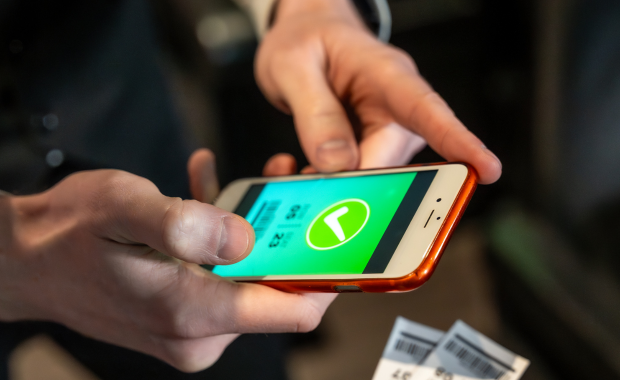

Check-in is the moment your booking system meets the real world. A guest who booked online three weeks ago now needs to be verified quickly, accurately, and without friction, often in conditions your office never has to deal with: bright sunlight on a phone screen, spotty cell coverage at a remote trailhead, a guide holding an umbrella in one hand and a phone in the other. This guide covers what to look for in a mobile ticket scanning app, and why this piece of your booking platform matters more operationally than its size suggests.
Why Check-In Technology Deserves Real Attention
Check-in is where booking errors become visible to the guest. A double-booked slot, an overlooked cancellation, or a stale availability count all surface at the exact moment a guest is standing in front of your staff expecting to be let in. A fast, accurate scanning app does not create these problems, but it does determine how quickly and gracefully your staff can resolve them when they occur.
Field conditions are nothing like office conditions. Poor cell signal, bright outdoor light, cold weather affecting touchscreen responsiveness, and guides who need to operate the app one-handed while managing a group are all realistic conditions your check-in tool needs to handle, not edge cases to design around later.
Speed at check-in directly affects guest experience and your own schedule. A slow check-in process creates a bottleneck that can delay an entire tour's departure, and a delayed departure creates cascading effects on every subsequent tour scheduled for that same guide or vehicle that day.
Core Features to Look For
Offline Functionality
This is the single most important feature for many tour operators, particularly those working outdoors, in rural areas, on the water, or in older buildings with poor cell reception. Your scanning app should be able to validate a QR code and mark a guest checked in even without an active internet connection, syncing that check-in data back to your main system once connectivity returns. A scanning app that requires a live connection to function is a real operational risk for any category where signal cannot be guaranteed.
Fast Scan-to-Confirmation Speed
The time between scanning a QR code and getting a clear valid or invalid confirmation on screen should be close to instant. Even a two or three second delay per guest adds up meaningfully when checking in a full coach load or a large group tour, and a slow app creates visible frustration for both your staff and waiting guests.
Clear Visual and Audio Confirmation
A scanning result needs to be unambiguous at a glance, ideally with both a clear visual indicator (green checkmark for valid, red for invalid or already used) and an audio cue that a guide can register without needing to stare closely at the screen while also managing a group of people. This matters especially in bright outdoor conditions where a screen can be hard to read quickly.
Manual Check-In Backup
Sometimes a guest's phone battery dies, a printed ticket is smudged beyond scanning, or a QR code simply will not scan for whatever reason. Your app should support a fast manual lookup by name or booking reference as a backup, without forcing your staff back to a completely separate system or a printed manifest when a scan fails.
Real-Time Manifest and Headcount Visibility
Your staff should be able to see, in real time, how many guests have checked in against the total booked for that specific departure, both for operational planning (do we wait a few more minutes for stragglers, or depart on time) and for safety and insurance purposes, where an accurate headcount at departure matters regardless of tour category.
Multi-User and Role-Based Access
If multiple staff members or guides need to check in guests simultaneously, for example at a large event or a multi-vehicle departure, your app should support multiple devices checking in against the same booking pool without creating a risk of double-counting or conflicting data between devices.
How This Connects to Broader Pass and Ticket Products
If you sell pass products alongside standard single-visit tickets, your scanning app needs to handle both cleanly, checking a standard ticket for validity and single-use status, while checking a pass against remaining usage limits and expiration date, all within the same scanning interface rather than requiring staff to switch between separate tools depending on what kind of product a guest is presenting. Our pass management software guide covers the usage tracking side of this in more depth, and the two systems need to work together tightly for check-in to stay fast and accurate across your full product range.
Category-Specific Considerations
Different tour and activity categories place different demands on check-in technology. City and walking tours often need offline functionality for old city centers with poor signal, and fast scanning for guests standing on a sidewalk. Sightseeing tours with large coach capacity need genuinely fast bulk check-in to avoid delaying a full vehicle's departure. Wildlife and eco tours, particularly those in remote protected areas, often face the most demanding offline conditions of any category, since cell coverage in genuinely remote natural areas can be entirely absent for extended stretches.
Hardware Considerations
Most modern scanning apps run on standard smartphones or tablets, avoiding the need for dedicated scanning hardware in most cases. However, for high-volume attractions or events with sustained, continuous check-in traffic, dedicated hardware scanners paired with the same underlying software can offer better durability and battery life than relying on a guide's personal smartphone throughout a long operating day. Consider your actual volume and operating conditions when deciding whether standard smartphone-based scanning is sufficient or whether dedicated hardware is worth the additional investment, and factor in replacement and repair costs over time, since dedicated hardware used daily in outdoor conditions will eventually need servicing or replacement regardless of initial build quality. Many operators find that a mix, standard smartphones for guides in the field and dedicated hardware at a fixed, high-traffic entry point, offers the best balance of flexibility and durability for their specific mix of operating conditions.
Training Staff on Check-In Technology
Because check-in often falls to seasonal or part-time staff, particularly guides and drivers who may have limited technology background, the app's usability directly affects how quickly new staff become productive at this task. A scanning interface that requires minimal training, with clear, obvious visual feedback and a straightforward backup process for failed scans, reduces the onboarding burden during your busiest hiring periods, similar to the staff training considerations discussed in our sightseeing tour booking software guide.
Reporting and Data From Check-In
Beyond the immediate operational function, check-in data feeds valuable reporting back into your broader business analytics. No-show rate by tour, by day of week, or by booking channel becomes visible once check-in data flows back into your main reporting system, informing decisions about deposit policies, reminder timing, and channel-specific booking patterns. Average check-in time per guest or per group can also reveal bottlenecks worth addressing, whether through staffing adjustments or a change in your check-in process itself.
Battery Life and Device Management for Full-Day Operations
A scanning app that drains a phone battery quickly, whether through constant screen brightness at maximum for outdoor visibility or through inefficient background processes, can leave a guide without a working device partway through a long operating day, particularly one running back-to-back departures. Ask about typical battery consumption during extended use, and consider whether your staff should carry portable battery packs as standard equipment during peak season, especially for roles involving many consecutive hours of active scanning.
Device management also matters at scale. If your operation involves several guides or check-in staff each carrying a device, having a clear process for keeping the scanning app updated across all devices, and a straightforward way to onboard a new or replacement device quickly when a phone is lost, damaged, or simply needs replacing, reduces the administrative overhead of managing your check-in technology fleet as your team grows, particularly during a rapid seasonal staffing ramp-up when several new devices might need to be configured and distributed within a short window before your peak season begins.
Integration With Physical Access Control
For attractions with turnstiles, gates, or other physical access control hardware, your scanning app may need to integrate directly with that hardware rather than functioning purely as a standalone handheld tool. This kind of integration typically requires more upfront technical setup than a simple handheld scanning app, but it can significantly increase throughput at high-traffic entry points compared to relying entirely on staff manually operating a gate based on a handheld scan result. If your attraction has enough sustained foot traffic to justify this kind of infrastructure investment, it is worth discussing directly with any platform vendor whether they support this kind of hardware integration or whether it would require a separate, disconnected system running alongside your main booking platform.
Common Mistakes When Choosing a Scanning App
Assuming connectivity will always be available. Testing a scanning app only in an office with strong wifi does not reveal how it performs at your actual departure points, which may have significantly worse connectivity. Test specifically in the actual field conditions your check-in process occurs in.
Overlooking manual backup functionality. A scanning app that has no graceful fallback when a QR code will not scan creates a genuine operational bottleneck the first time it happens during a busy departure.
Not considering multi-device coordination. If more than one staff member checks in guests simultaneously for large events or multi-vehicle departures, confirm the app handles this without data conflicts before you rely on it for a high-stakes, high-volume event.
Underestimating the training burden for seasonal staff. An app that takes a new guide a full shift to learn confidently costs you real productive time during your busiest hiring and onboarding periods.
Getting Started
Test any scanning app candidate directly at your actual departure points and under your actual operating conditions, not just in a demo environment with strong wifi and ideal lighting. Ask specifically about offline functionality, manual backup processes, and multi-device support if relevant to your operation, and have an actual guide or check-in staff member try the interface themselves rather than relying solely on a vendor-led demonstration.
For related reading, see our booking desk overview, which covers the broader front-of-house operations that check-in fits into, and our resource scheduling guide, relevant to understanding how guide and staff assignments connect to the check-in process for a given departure. Reviewing both alongside your check-in technology choice gives you a fuller picture of how the front-of-house side of your operation fits together, from scheduling the right staff to the actual moment a guest is confirmed and welcomed into their experience.
Why This Piece of Software Gets Overlooked
Compared to flashier features like dynamic pricing or channel management, a scanning app can seem like a minor utility, the kind of tool nobody thinks much about until it fails at exactly the wrong moment. This is precisely why it deserves deliberate evaluation rather than an afterthought decision made by default because it happened to come bundled with whichever booking platform you chose for other reasons. A booking platform with excellent scheduling and distribution features but a clunky, unreliable check-in app will still create daily friction at the one moment where your business and your guest actually meet face to face.
Frequently Asked Questions
Do I really need offline functionality if my location generally has good cell coverage?
Generally good coverage is not the same as guaranteed coverage, and a single check-in failure during a busy departure due to a temporary signal drop can create real frustration and delay. Given that offline functionality is a standard feature in well-built scanning apps, it is worth having as a safety net even if you rarely expect to need it.
How much does hardware matter compared to the software itself?
For most operators, standard smartphones running well-designed scanning software are entirely sufficient. Dedicated scanning hardware becomes worth considering mainly for very high-volume, continuous check-in operations like major attractions or large events, where durability and extended battery life during a long operating day become meaningful factors.
What should I do if a guest arrives without a working QR code or ticket?
Your check-in process should support a fast manual lookup by name or booking reference as a standard backup, not an exceptional workaround. If your current or prospective scanning app does not support this cleanly, it is worth asking specifically how the vendor recommends handling this common scenario.
Is check-in speed really worth optimizing for, or is a slightly slower but simpler app fine?
For low-volume operations with plenty of buffer time before departure, a slightly slower app may be entirely workable. For higher-volume operations, coach tours, large groups, or back-to-back departures with tight turnaround times, check-in speed has a direct, measurable effect on whether your schedule holds together across a full operating day, making it a genuinely important factor rather than a minor convenience.
Should I invest in dedicated scanning hardware or physical access control integration, or is a smartphone app enough?
For most small to mid-sized tour and activity operators, a well-designed smartphone app is entirely sufficient and avoids the additional cost and complexity of dedicated hardware or turnstile integration. This kind of infrastructure investment tends to make sense specifically for larger attractions with sustained, high-volume foot traffic where the throughput gains justify the setup cost and ongoing hardware maintenance, rather than for a typical guided tour operation with periodic, moderate-sized group departures.
How do I know if my current check-in process is actually a bottleneck worth fixing?
Time your actual check-in process for a typical departure, from the first guest arriving to the last guest confirmed and the vehicle or group departing. If this consistently runs longer than a few minutes for a moderate group size, or if you notice guides regularly delaying departure to finish checking people in, that is a reasonably clear signal that your check-in speed is affecting your schedule and is worth addressing directly rather than accepting as an unavoidable part of operations.
Ultimately, the mobile scanning app is a small piece of software that carries an outsized amount of operational weight. It is the tool your front-line staff, often your least experienced and most seasonal team members, rely on every single day to make the moment of arrival smooth for your guests. Investing real attention into getting this piece right, testing it under actual field conditions rather than an idealized office demo, pays off in fewer delayed departures, fewer frustrated guests, and less time your staff spend troubleshooting a tool that should simply work, quietly, in the background, every single time a guest arrives ready for their experience. It is a small line item on a feature comparison sheet, but it shows up daily in the actual experience of running the business, guest by guest, departure by departure, all season long.
Related Posts

Frequently Asked Questions
No. Zaui’s pricing is fully pay-as-you-go. You aren’t locked into any long-term contract. In fact, leading platforms emphasize this flexibility. Similarly, Zaui lets you start and stop anytime. You can change or cancel your plan freely, so you only pay for what you use.
Absolutely not. Zaui’s pricing is 100% transparent. We disclose all fees up front with no surprise add-ons or “sneak-in” charges. In fact, Zaui’s plans include all core features “without additional fees”. Industry experts note that hidden fees undermine trust so we avoid them entirely. All costs are clearly outlined in our pricing, and there are no extra setup charges or undisclosed surcharges at checkout.
Zaui integrates with major payment gateways (e.g. Stripe) so you only pay standard credit-card processing rates (roughly 1.9%+$0.30/transaction) and we don’t mark them up. Only the published platform commission is added on bookings. You also have full control over who pays the commission, we let you decide whether to absorb booking fees or pass them on to customers. In short, you’ll only pay the transparent booking commission and normal gateway fees, nothing extra.
Your onboarding and support are included in the price. We provide white-glove setup help and ongoing 24/7 support at no additional cost. Our dedicated customer-success team will guide you through every step, ensuring a smooth launch. You won’t pay extra for training or service other than the onboarding fee; it's all built into your plan.
You can schedule a free demo with our team. Our Zaui ninjas will walk you through pe how Zaui can work for your business and highlight opportunities to grow with our advanced features all without any upfront payment. This way, you can feel confident it’s the right fit before making a commitment.
Of course. Zaui’s plans are fully flexible. You can upgrade or downgrade at any time to match your needs, without penalties. You can move to a higher tier or back down easily, and your billing adjusts automatically.
No. Zaui does not charge its commission on offline/manual bookings. “No fees on offline bookings” You only pay the commission when a booking is processed online through our system. Manual reservations (or bookings from partner channels we set up for you) incur no extra platform fee. (30% or less)
All of Zaui’s core features are included in your plan at no extra charge. We believe in value and transparency: Zaui provides over 15 advanced features (Google Things to do, reporting tools, marketing tools, reports, etc.) at no additional cost. Many competitors charge extra or require higher plans for the same features, but with Zaui you get the full suite of tools in one package. Any optional add-ons (if any) will always be clearly listed and optional there are no surprise paid upgrades for standard features.
Each Zaui plan is designed for clarity and fairness, following industry best practices. You can trust that our pricing is transparent and flexible, with the support you need built in.
Extra accounts- unlimited agents, resellers, user
