


Quick Answer
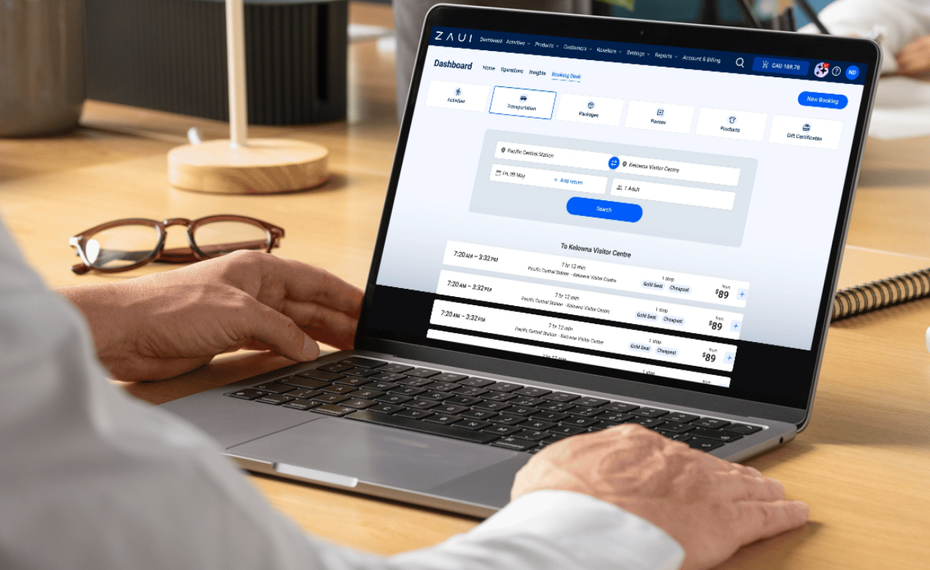
The Zaui Booking Desk is a dedicated staff-facing interface for taking reservations by phone, at a front desk, or through a concierge or retail partner without using the customer-facing booking checkout. Bookings taken through the Booking Desk deduct from the same inventory pool as your online bookings and OTA channel reservations. There is no separate reconciliation, no risk of double-booking between channels, and no need for your staff to navigate the same interface your customers use. It is built for speed and simplicity for the person taking the booking on behalf of a guest.
The Problem It Solves
Tour and transport operators receive bookings through more than one channel. Online bookings come through your website. OTA bookings come from Viator, GetYourGuide, and other partners. But a meaningful share of bookings come in through a different route entirely: a phone call, a hotel concierge, a front-desk conversation, or a retail partner who sells your tours. If your booking system is designed around a customer-facing checkout -- a date picker, participant count, payment form, confirmation email -- it is not designed for the person on your team who needs to take a phone booking in 90 seconds while a guest is waiting. They end up either using a workaround (a separate spreadsheet, a manual entry that gets reconciled later) or fighting through the customer checkout on behalf of a guest. Both workarounds create real problems. A spreadsheet that is not connected to your main booking system does not reduce your available inventory. You can end up with a phone booking and an online booking for the same tour at the same time. The Booking Desk is the solution: a purpose-built staff interface that connects directly to the same inventory as your online booking engine and OTA channels.
What the Booking Desk Does
Takes bookings quickly without a customer-style checkout flow. The Booking Desk interface is designed for someone who knows your products and just needs to record a reservation. It strips out the elements that exist to guide an unfamiliar customer through a purchase decision and leaves the elements a staff member needs: product selection, date, time, participant count, guest details, payment.
Deducts from the same inventory pool as all other channels. A booking taken through the Booking Desk immediately reduces availability on your website booking widget and on every connected OTA channel. If you have two seats left on your 9 AM tour and a walk-in books one through the Booking Desk, your website immediately shows one seat remaining. No reconciliation step. No risk of the same seat being booked twice.
Handles payment at the point of booking. The Booking Desk supports card payment, cash recording, and invoice generation depending on how you set up the payment workflow for each scenario. A hotel concierge booking on behalf of a guest can record the reservation with a note for billing. A front-desk walk-in can pay by card immediately.
Generates confirmation for the guest. Once a booking is completed, the Booking Desk sends the standard booking confirmation to the guest -- the same confirmation your online booking engine sends, with the same tour details, meeting point, and what-to-bring information.
Records the booking source. Bookings taken through the Booking Desk are recorded with their source; front desk, phone, concierge partner, specific retail partner. This shows up in your reporting, so you can see what proportion of your bookings come through staff channels versus online channels versus OTAs.
Who Uses the Booking Desk
Front-desk staff at your own location. Customers who walk up and book in person do not need to use your website. Your staff can take the booking in the Booking Desk while the guest is standing there. The booking confirmation goes to the guest's email, the inventory updates, and the tour manifest is automatically updated before departure.
Phone reservation staff. Customers who call to book can have their reservation taken by the person who answers the call. No separate form, no manual reconciliation with a spreadsheet. The phone booking goes straight into the same system as all other bookings.
Hotel concierges and front desks. If you have partnerships with hotels where concierge staff book tours on behalf of hotel guests, the Booking Desk gives those partners access to book into your inventory directly. They see real availability, take the booking, and the guest receives a confirmation. You see all concierge bookings in your dashboard with the source tagged.
Retail partners and visitor centers. If visitor centers, travel agencies, or other retail locations sell your tours, the Booking Desk can be configured for those partners to book into your live inventory. This is cleaner than managing a separate allocation block for each partner and then reconciling at the end of the day.
Dock staff for walk-up marine bookings. For boat tours, whale watching operations, or ferry services where walk-up customers arrive at the dock, dock staff can take bookings and payment through the Booking Desk without going through a customer checkout flow. The booking is immediately reflected in the departure manifest.
How the Booking Desk Fits Into Your Inventory
Without a unified inventory system, each booking channel maintains its own count of available seats or spaces. An online booking and a phone booking taken at the same time can both succeed for the same spot if they are drawing from separate availability pools. Reconciling those two pools happens after the fact, when it is too late to fix cleanly. With a unified inventory system, every booking channel draws from the same pool. When a seat is booked through any channel, it is immediately unavailable on every other channel. The Booking Desk is part of this unified system. A booking taken by a front-desk staff member through the Booking Desk reduces the count on your website, on Viator, on GetYourGuide, and on every other connected channel simultaneously. In real time. This is what prevents the core operational nightmare of double-booking.
The Booking Desk and Your Operations Reporting
Every booking taken through the Booking Desk appears in your standard reporting with source attribution. You can see at any time: what percentage of your bookings come through the Booking Desk versus online versus OTAs; which specific staff members or partner accounts are generating Booking Desk reservations; revenue breakdown by booking channel; and Booking Desk activity by tour, by time period, and by payment method. Operators who only look at online bookings and OTA bookings often undercount their phone and walk-in volume. The Booking Desk makes that volume visible in the same reporting layer as your other channels.
Setting Up Partner Access
One of the more operationally useful aspects of the Booking Desk is the ability to give hotel concierges, visitor center staff, or retail partners their own login access that is scoped to only what they need. A concierge partner can have access to book tours into your live inventory without having access to your full dashboard, your financial reporting, or your internal operations tools. You control what each partner login can see and do. You see all partner bookings in your dashboard, tagged by which partner account made them. This is meaningfully cleaner than the alternatives: giving partners a separate allocation (which requires reconciliation), emailing availability on request (which is slow and inaccurate), or having partners direct guests to your website (which removes the concierge from the booking flow entirely).
FAQ
What is the Zaui Booking Desk? The Booking Desk is a dedicated staff-facing interface within Zaui for taking reservations by phone, at a front desk, or through concierge and retail partners. It lets staff complete bookings quickly without navigating the customer-facing checkout flow, and it deducts from the same inventory pool as your online and OTA bookings.
How is the Booking Desk different from the regular Zaui booking flow? The customer-facing booking checkout is designed to guide an unfamiliar guest through a purchase decision. The Booking Desk is designed for a staff member who knows your products and needs to record a reservation quickly. It is faster, stripped of the customer guidance elements, and accessible to partner logins with scoped permissions.
Does the Booking Desk prevent double-booking? Yes. Because Booking Desk reservations draw from the same inventory pool as all other booking channels, a seat booked through the Booking Desk is immediately unavailable on your website and on all connected OTA channels. There is no reconciliation step.
Can I give hotel concierges access to the Booking Desk? Yes. Zaui allows you to create partner login access that is scoped to the Booking Desk without giving partners access to your full operations dashboard. Partners see real availability and can complete bookings. All partner bookings appear in your reporting with source attribution.
Does the Booking Desk work for transport and shuttle operations? Yes. For shuttle and transport operators, the Booking Desk is particularly useful for walk-up passengers, phone bookings, and corporate account bookings. Staff can take bookings and payment at the dock or terminal without using the customer-facing website checkout.
Is the Booking Desk included in all Zaui plans? Check with the Zaui team for current plan details. Contact the Zaui team to confirm which plan tier includes Booking Desk access and whether there are any setup requirements for partner login configurations.
Last reviewed June 2026. Platform features may change. Verify current Booking Desk functionality and plan availability directly with Zaui.
Related Posts

Frequently Asked Questions
No. Zaui’s pricing is fully pay-as-you-go. You aren’t locked into any long-term contract. In fact, leading platforms emphasize this flexibility. Similarly, Zaui lets you start and stop anytime. You can change or cancel your plan freely, so you only pay for what you use.
Absolutely not. Zaui’s pricing is 100% transparent. We disclose all fees up front with no surprise add-ons or “sneak-in” charges. In fact, Zaui’s plans include all core features “without additional fees”. Industry experts note that hidden fees undermine trust so we avoid them entirely. All costs are clearly outlined in our pricing, and there are no extra setup charges or undisclosed surcharges at checkout.
Zaui integrates with major payment gateways (e.g. Stripe) so you only pay standard credit-card processing rates (roughly 1.9%+$0.30/transaction) and we don’t mark them up. Only the published platform commission is added on bookings. You also have full control over who pays the commission, we let you decide whether to absorb booking fees or pass them on to customers. In short, you’ll only pay the transparent booking commission and normal gateway fees, nothing extra.
Your onboarding and support are included in the price. We provide white-glove setup help and ongoing 24/7 support at no additional cost. Our dedicated customer-success team will guide you through every step, ensuring a smooth launch. You won’t pay extra for training or service other than the onboarding fee; it's all built into your plan.
You can schedule a free demo with our team. Our Zaui ninjas will walk you through pe how Zaui can work for your business and highlight opportunities to grow with our advanced features all without any upfront payment. This way, you can feel confident it’s the right fit before making a commitment.
Of course. Zaui’s plans are fully flexible. You can upgrade or downgrade at any time to match your needs, without penalties. You can move to a higher tier or back down easily, and your billing adjusts automatically.
No. Zaui does not charge its commission on offline/manual bookings. “No fees on offline bookings” You only pay the commission when a booking is processed online through our system. Manual reservations (or bookings from partner channels we set up for you) incur no extra platform fee. (30% or less)
All of Zaui’s core features are included in your plan at no extra charge. We believe in value and transparency: Zaui provides over 15 advanced features (Google Things to do, reporting tools, marketing tools, reports, etc.) at no additional cost. Many competitors charge extra or require higher plans for the same features, but with Zaui you get the full suite of tools in one package. Any optional add-ons (if any) will always be clearly listed and optional there are no surprise paid upgrades for standard features.
Each Zaui plan is designed for clarity and fairness, following industry best practices. You can trust that our pricing is transparent and flexible, with the support you need built in.
Extra accounts- unlimited agents, resellers, user
