

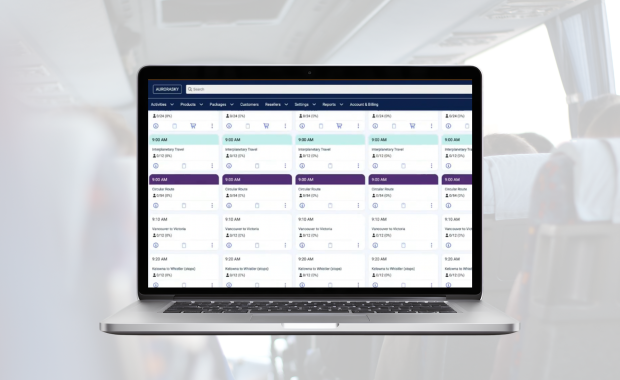

The right booking software for a coach or motorcoach company needs to do a handful of things well, and most vendor pitches skip past them. It needs to run scheduled and fixed-route service with live seat inventory, not just one-off charter bookings. It needs to keep multi-leg itineraries connected under a single passenger record instead of scattering a trip across separate bookings. It needs to give dispatchers a real-time view of which vehicles and drivers are assigned to which departures, so a double-booked coach or an unassigned route shows up before it becomes a problem on the road. It needs to produce reporting your finance and operations teams actually use, connect to the resellers that sell your seats, and accept payments through gateways you already rely on. Just as important, you need a clear picture of onboarding and data migration before you sign anything, since a platform that looks polished in a demo can still cost weeks of staff time if the switch is handled badly. This article walks through each area as a set of questions to put to any vendor, using Zaui's real capabilities as one example of how a platform can answer them.
Start With What You Actually Operate
Before you compare feature lists, get honest about what kind of operation you're running, because booking software built for one model of business does not automatically work for another. A lot of platforms marketed to "transportation companies" are built around on-demand, point-to-point trip quoting, the kind of workflow a limousine or private charter company needs. That is a different problem than running a fixed timetable with recurring departures, published seat inventory, and passengers booking a specific 7:15am run three weeks in advance.
If your business is built around scheduled or semi-scheduled service, intercity routes, airport shuttles on a timetable, or day tours that run the same route on a repeating schedule, you need a platform whose core data model treats a departure as a specific time slot with a seat count, not as a quote request that gets negotiated after the fact. Ask any vendor directly: does your system treat a scheduled departure as first-class data, with its own capacity, its own vehicle assignment, and its own live availability that customers can see and book against online? If the honest answer involves phrases like "we can configure that" or "our team handles that manually," you are looking at a charter-quoting tool wearing scheduling clothes, and you will feel that mismatch every day once you're live.
This is worth spending real time on before you even start a demo cycle. A platform built for scheduled and fixed-route operations, the kind Zaui supports with published timetables and live per-departure seat inventory, will feel completely different in daily use than one that was retrofitted from a quoting tool. The distinction matters more than almost any other feature on this list, because it shapes everything downstream: how dispatch works, how reporting is structured, and how your OTA and reseller feeds behave.
Ask Whether It Handles Multi-Leg Itineraries
Coach and motorcoach operations are rarely a single point-to-point hop. A passenger might ride a feeder route to a hub, transfer to a longer intercity leg, and then connect to a local shuttle at the far end, all booked as one trip. If your booking software treats each of those legs as a separate, disconnected booking, your staff ends up manually reconciling passenger records across systems, and a schedule change on one leg does not automatically flow through to the others.
Ask a vendor specifically how their system handles connected itineraries: can a single booking span multiple legs with one passenger record that stays intact from the first leg to the last? When a departure time shifts on one leg, does the connected schedule stay in sync automatically, or does someone have to manually update every downstream leg by hand? This distinction becomes especially visible during irregular operations, when weather or traffic pushes a departure late and every connected leg needs to reflect that change at once. For background on how this class of problem gets solved in practice, see this breakdown of multi-leg coach and bus operations software, which goes deeper into how connected schedules and single passenger records work across legs.
Look Hard at Fleet and Resource Dispatch
Booking software that stops at the point of sale is only solving half the problem for a fleet operator. The other half is what happens on the operations side once a seat is sold: which vehicle is assigned to that departure, which driver is on it, and whether the whole day's schedule is running at, under, or over capacity. This is where a lot of platforms built primarily for tour and activity sellers fall short once you scale up to a real fleet with dozens of vehicles and drivers running concurrent routes.
Ask to see the actual operations dashboard, not just the customer-facing booking flow. A dispatcher should be able to open a single daily, weekly, or monthly view of every scheduled departure, with columns showing booked count against total capacity, the percentage of seats filled, which vehicle is assigned, and which employees are assigned. Overbooked or near-capacity departures should be visually flagged automatically, not something a dispatcher has to notice by manually cross-checking a spreadsheet. Zaui's Booking Desk, for example, surfaces this with a red lightning-bolt alert and a specific overbooking count when a departure runs negative on capacity, and a yellow warning indicator when a departure is approaching full. It also supports parent activities with sub-activities or legs underneath them, which matters when one route on the schedule is actually several connected segments. For a closer look at what this kind of dispatch view should offer, read this guide to booking desk software for coach dispatch.
Beyond the dashboard, ask how resource assignment actually works day to day. Can a dispatcher reassign a vehicle or driver to a different departure in a few clicks when a coach breaks down or a driver calls in sick? Can the system flag when the same vehicle has been assigned to two overlapping departures by mistake? These are the questions that separate software that merely takes bookings from software that actually runs a fleet. If fleet-level dispatch is a priority for your evaluation, this overview of motorcoach fleet management software is a useful companion to this section.
Check the Reporting and Data Delivery Options
A coach company generating meaningful revenue needs reporting that goes well beyond a basic sales summary. You need to see route-level performance over time, capacity utilization by departure and by day of week, driver and vehicle utilization, payment reconciliation across gateways, and reseller or OTA performance broken out separately from direct bookings. If your finance team or your ownership group needs a specific report every month, ask the vendor point blank whether that report exists out of the box or whether it has to be built custom, and if custom, at what cost and on what timeline.
It's also worth asking how data gets out of the system and into whatever else you use, whether that's an accounting platform, a business intelligence tool, or a spreadsheet your operations manager already trusts. A platform with a large library of pre-built reports, Zaui offers more than 135 along with custom reporting and custom data delivery to third-party systems, gives you a much better starting position than one where every non-standard report is a support ticket. Ask specifically about scheduled or automated data delivery, not just manual exports, since manual exports tend to quietly stop happening once the person who used to run them moves on.
Understand OTA and Reseller Distribution Support
If any meaningful share of your seats gets sold through resellers or online travel agencies rather than direct bookings, distribution support is not a nice-to-have feature, it's core infrastructure. Ask which channels a vendor actually connects to today, not which channels are on a future roadmap. For transportation specifically, that means asking about connections to transportation-focused resellers, not just general travel OTAs.
Zaui's own distribution connections include transportation resellers such as Wanderu, Busbud, and Distribusion, in addition to broader travel channels like Viator, GetYourGuide, and Expedia, along with support for Google Things to Do. The important operational question is not just whether a connection exists, but whether inventory stays synchronized in real time across every channel, so a seat sold through a reseller is immediately reflected as unavailable everywhere else. Ask how a vendor's channel manager handles conflicts, and ask to see an example of how a schedule change propagates out to connected channels. For a closer look at this specific area of evaluation, this article on coach OTA and reseller distribution software covers what to look for in more detail.
Confirm Payment Gateway Coverage
Payment flexibility matters more for coach and motorcoach operators than it might seem at first glance, particularly if you operate across multiple regions, sell through group and agent channels with different payment terms, or are locked into a merchant relationship you don't want to unwind as part of a software switch. Ask directly which payment gateways a platform supports, and confirm your current or preferred gateway is actually on that list rather than assuming it will be.
Zaui's marketing lists support for more than 17 payment gateways, including commonly used ones like Stripe, Square, PayPal, and Authorize.Net. Beyond the raw list, ask how the platform handles partial payments, deposits for group bookings, refunds tied to schedule changes, and multi-currency transactions if you operate across a border. These details rarely come up in a first demo but matter a great deal once you're processing real transaction volume. For a broader look at how pricing, payments, and scheduling fit together in one system, see this overview of coach fleet pricing, payments, and scheduling.
Plan for Onboarding and Migration Before You Sign
The single most underestimated part of choosing booking software is what happens in the weeks after the contract is signed. Ask a vendor to walk you through their actual onboarding process in detail: who loads your existing route and schedule data, how long does that typically take for an operation your size, and what does your staff need to do versus what the vendor's team handles. Ask specifically how historical booking and passenger data gets migrated, and whether any of it is at risk of being left behind or only partially transferred.
It's also worth asking pointed questions about driver and dispatcher training, since a system that dispatchers find confusing on day one creates real operational risk, not just an inconvenience. Ask whether training happens live with your actual schedules and your actual staff, or whether it's a generic walkthrough that leaves your team to figure out the specifics on their own. If you're currently on another platform, this guide to coach booking platform migration covers the practical sequencing of a switch, including how to avoid gaps in OTA connectivity or lost historical reporting during the transition. And if you want a structured, step-by-step approach to the whole buying decision beyond just the questions to ask, the motorcoach and coach software buying guide walks through the process from initial shortlist to final cutover.
Frequently Asked Questions
What is the difference between charter booking software and scheduled coach booking software?
Charter booking software is generally built around one-off quote requests and negotiated point-to-point trips, where each booking is essentially custom. Scheduled coach booking software is built around a published timetable with recurring departures and live seat inventory that customers can book directly online. If your business runs fixed or semi-fixed routes on a repeating schedule, you want a platform built around the second model, since a charter-style tool will force you to work around its data structure rather than with it.
Can one booking software handle both scheduled routes and multi-leg itineraries?
Yes, platforms built for scheduled operations can also support connected multi-leg itineraries, where a single booking spans several legs and stays tied to one passenger record throughout the trip. The key question to ask any vendor is whether a schedule change on one leg automatically updates the connected legs, or whether that has to be done manually across separate bookings.
What reporting should coach and motorcoach companies expect from booking software?
At minimum, expect route-level performance reporting, capacity utilization by departure, driver and vehicle utilization, payment reconciliation, and reseller or OTA performance reported separately from direct sales. Ask whether these reports come pre-built or require custom development, and whether data can be delivered automatically to other systems you use rather than exported manually.
Which OTAs and resellers matter most for bus and coach companies specifically?
General travel OTAs like Viator, GetYourGuide, and Expedia matter for tour-style bookings, but transportation-focused resellers such as Wanderu, Busbud, and Distribusion tend to matter more for scheduled intercity and ground transportation routes specifically. Ask any vendor which of these channels they connect to today, not which are planned for a future release.
How long does it typically take to migrate to new coach booking software?
Timelines vary significantly based on the size of your route network, how much historical data needs to move, and how many OTA or reseller connections have to be rebuilt. Rather than relying on a vendor's general estimate, ask for a migration plan specific to your operation's route count, staff size, and existing integrations, and build in time for a parallel-running period before a full cutover.
What payment gateways should coach booking software support?
Look for broad support across major gateways, including options like Stripe, Square, PayPal, and Authorize.Net, along with the ability to handle deposits, partial payments, and refunds tied to schedule changes. If you operate across a border or in multiple currencies, confirm multi-currency handling specifically, since not every platform supports it equally well.
Does booking software help with dispatching drivers and vehicles, or only with selling seats?
The better platforms do both. Look for a central operations view that shows scheduled departures alongside which vehicle and which driver are assigned to each one, with automatic flags when a departure is overbooked or a resource is double-assigned. Software that only handles the sales side leaves dispatch as a manual, spreadsheet-driven process layered on top.
Is it worth switching booking software if our current system technically works?
It depends on where the friction actually is. If your current system handles scheduling and dispatch fine but struggles with reporting, OTA connections, or multi-leg itineraries, a targeted evaluation against those specific gaps is more useful than a wholesale switch. Map your actual pain points first, then compare platforms against that list rather than against a generic feature checklist.
Related Posts

Frequently Asked Questions
No. Zaui’s pricing is fully pay-as-you-go. You aren’t locked into any long-term contract. In fact, leading platforms emphasize this flexibility. Similarly, Zaui lets you start and stop anytime. You can change or cancel your plan freely, so you only pay for what you use.
Absolutely not. Zaui’s pricing is 100% transparent. We disclose all fees up front with no surprise add-ons or “sneak-in” charges. In fact, Zaui’s plans include all core features “without additional fees”. Industry experts note that hidden fees undermine trust so we avoid them entirely. All costs are clearly outlined in our pricing, and there are no extra setup charges or undisclosed surcharges at checkout.
Zaui integrates with major payment gateways (e.g. Stripe) so you only pay standard credit-card processing rates (roughly 1.9%+$0.30/transaction) and we don’t mark them up. Only the published platform commission is added on bookings. You also have full control over who pays the commission, we let you decide whether to absorb booking fees or pass them on to customers. In short, you’ll only pay the transparent booking commission and normal gateway fees, nothing extra.
Your onboarding and support are included in the price. We provide white-glove setup help and ongoing 24/7 support at no additional cost. Our dedicated customer-success team will guide you through every step, ensuring a smooth launch. You won’t pay extra for training or service other than the onboarding fee; it's all built into your plan.
You can schedule a free demo with our team. Our Zaui ninjas will walk you through pe how Zaui can work for your business and highlight opportunities to grow with our advanced features all without any upfront payment. This way, you can feel confident it’s the right fit before making a commitment.
Of course. Zaui’s plans are fully flexible. You can upgrade or downgrade at any time to match your needs, without penalties. You can move to a higher tier or back down easily, and your billing adjusts automatically.
No. Zaui does not charge its commission on offline/manual bookings. “No fees on offline bookings” You only pay the commission when a booking is processed online through our system. Manual reservations (or bookings from partner channels we set up for you) incur no extra platform fee. (30% or less)
All of Zaui’s core features are included in your plan at no extra charge. We believe in value and transparency: Zaui provides over 15 advanced features (Google Things to do, reporting tools, marketing tools, reports, etc.) at no additional cost. Many competitors charge extra or require higher plans for the same features, but with Zaui you get the full suite of tools in one package. Any optional add-ons (if any) will always be clearly listed and optional there are no surprise paid upgrades for standard features.
Each Zaui plan is designed for clarity and fairness, following industry best practices. You can trust that our pricing is transparent and flexible, with the support you need built in.
Extra accounts- unlimited agents, resellers, user
